
The Partners Debt Report answers how much each partner owes you or you owe the partner right now. It lists the partners with their details and one amount, the balance of everything due and paid between you. Open it from Reports → Partners → Partners Debt….
Filter
The Partners Debt Report window opens first. Fill in only the filters you need: an empty filter does not limit the report. Click OK to run the report. Clear empties the filters and sets the check boxes back to their default. The window keeps the last filter you ran.
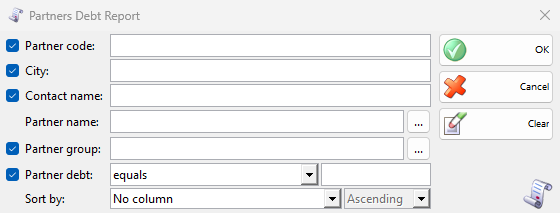
The check box in front of a filter puts its column in the result. A filter without a check box always has its column. Each row is one partner, so a cleared check box only hides its column. A text filter finds the values that contain the text. Press F4 or click … to choose from a list.
| Filter | What it limits | Column by default |
|---|---|---|
| Partner code:, City:, Contact name: | The partners by their code, city or contact name. | Shown |
| Partner name: | The partners by name. | Always shown, no check box |
| Partner group: | The partners of a group. | Shown |
| Partner tag: | Listed when partner tags exist. It only filters. | No column |
| Partner debt: | The partners by their balance: choose equals, not equals, more than or less than and type a number, for example more than 0 for the partners who owe you. | Shown |
| Sort by: | Sorts by Partner Name, Partner Code or UIC, ascending or descending. | – |
Results
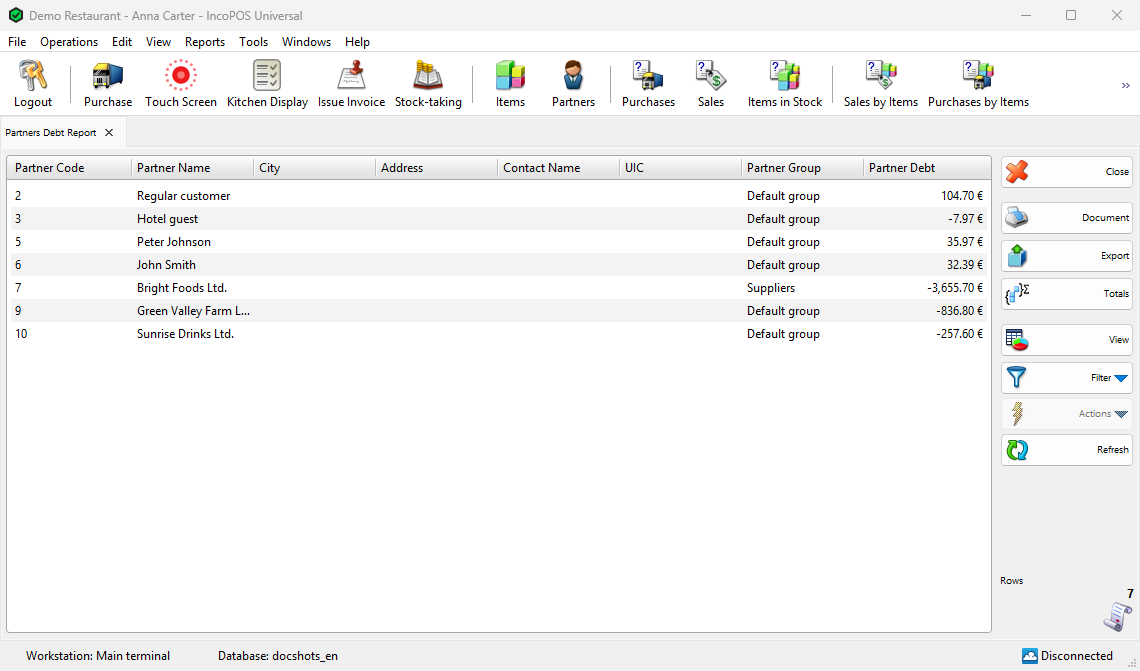
The result opens in its own tab. The example below has not equals 0 in Partner debt:, so it leaves out the partners without a balance.
| Column | What it shows |
|---|---|
| Partner Code, Partner Name, City, Address, Contact Name, UIC, Partner Group | The partner, as it is now in Partners. UIC has the name of the company ID of your country, for example TIN. |
| Partner Debt | The amounts due from the partner minus the amounts due to the partner, after all payments. More than 0: the partner owes you. Less than 0: you owe the partner, or the partner has paid you in advance. |
How the numbers are counted
- The report reads all amounts due and all payments of the partner, of every date. It has no period: it shows the balance now.
- Sales, consignment sales, debit notes and purchase returns make the partner owe you. Purchases, returns and credit notes make you owe the partner. A payment lowers what it pays, and an advance payment of the partner lowers the balance until it is used.
- Drafts have no payments, so they do not count. An annulled document and its payments no longer count, and an edited payment counts with its new amount.
- Every partner is listed, also the ones without documents and the ones moved to the Deleted group.
- The amounts are kept in the main currency of the program and shown in the currency that has Use for partner balance in Currencies, or in the main currency when none has it.
Work with the results
Document opens the print preview of the result with its filters, and Export saves it to a file. Totals adds a row with the total of Partner Debt: what all partners owe you less what you owe. View shows the result as bars or a pie (see View Report Results). Filter → Report Filter shows the filters next to the result and runs it again as you change them, Report Filter as New… opens the result of another filter in a new tab, and Quick Filter searches the text of the rows. Refresh runs the report again. The report can also be a panel of the Dashboard.
Double-click a row or use Actions → Edit to open its partner (see Adding, editing and deleting partners).
Permissions
All permissions are set in Edit → Administration → Permissions….
| Permission | What it allows | Not allowed by default for |
|---|---|---|
| Reports → Partners → Partners Debt… | The report. | Operators (the whole Reports menu) |
A user with a Locked partner: in the user’s settings gets that partner fixed in Partner name:.
FAQ
Which documents make up the debt of a partner?
Use Payments by Documents with the partner in Partner name:: it shows the amount due and paid of each document. Payments Due Dates shows when the unpaid amounts are due.
Can I see the debt for a period?
This report has no date and always shows the balance now. To see what was due and paid for the documents of a period, use Payments by Partners with that period in Date:.
How do I list only the customers who owe me?
Choose more than in Partner debt: and type 0. Add the customers’ group in Partner group: to leave out other partners.