
The Cashmatic processor sends cash payments to a Cashmatic cash machine on the network. The customer puts the notes and coins in the machine and the machine gives the change. Get the address of the machine and a user of the machine from the supplier. The common fields and the steps are in Adding, editing and deleting payment processors.
Settings
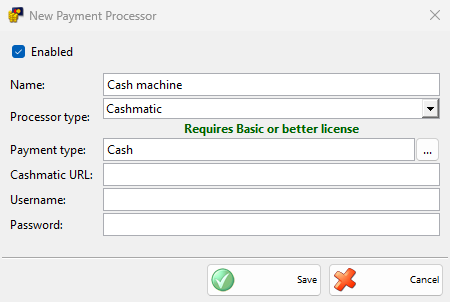
| Field | What it does |
|---|---|
| Payment type: | Select the payment types paid in the machine, usually a cash payment type. |
| Cashmatic URL: | The address of the machine. Without a port, port 50301 is used, and without http:// or https://, https:// is used. It is required. |
| Username:, Password: | The user that IncoPOS signs in with on the machine. Both are required. |
Taking a payment
The machine takes the payments of every document, not only of sales, when the amount is received from the customer.
- Save the document and choose a payment type of the processor in the Payment window, then click OK.
- The Process Card Payment window shows “Please enter the amount in the cash machine” and “Expected amount:”. When the customer starts paying, it shows the remaining amount and the amount received.
- When the machine finishes the payment, the window closes and the document is saved.
Cancel cancels the payment on the machine, and the Payment window stays open. When the machine cannot give all the change, the amount it did not give is added to the payment, so the payment shows what the machine kept.
Without a Basic or better license, IncoPOS shows the license message once and saves the payments without the machine.
Troubleshooting
| Message | Solution |
|---|---|
| “The connection with the cash machine failed! …” | IncoPOS could not reach the machine or sign in. Check that the machine is on, Cashmatic URL:, Username: and Password:. The rest of the message is the answer of the machine. |
| “Starting payment with the cash machine failed! …” | The machine did not start the payment, for example because it is busy. Finish the operation on the machine and try again. |
| “Getting payment information from the cash machine failed! …” | The connection was lost during the payment. Check the machine and the network, and check on the machine what was paid before you take the payment again. |