
IncoCloud is the cloud platform that connects your IncoPOS installations across multiple locations and enables seamless integration with third-party systems through a powerful REST API
What is IncoCloud?
IncoCloud serves as the central hub for your IncoPOS ecosystem, providing:
- Multi-location synchronization – Connect up to 99 locations per database group
- Continuous backup – Automatic data protection with encrypted cloud storage
- Remote database access – Manage your business data from anywhere
- REST API – Build custom integrations with e-commerce, accounting, and other systems
- Webhook notifications – Real-time event notifications for automation
💡 Key Benefit: IncoCloud eliminates the need for complex VPN setups while providing secure, real-time data synchronization across all your business locations.
Core Features
🔄 Multi-Location Synchronization
Connect multiple stores, warehouses, or restaurants into one unified system. Changes made at any location are automatically synchronized within seconds.
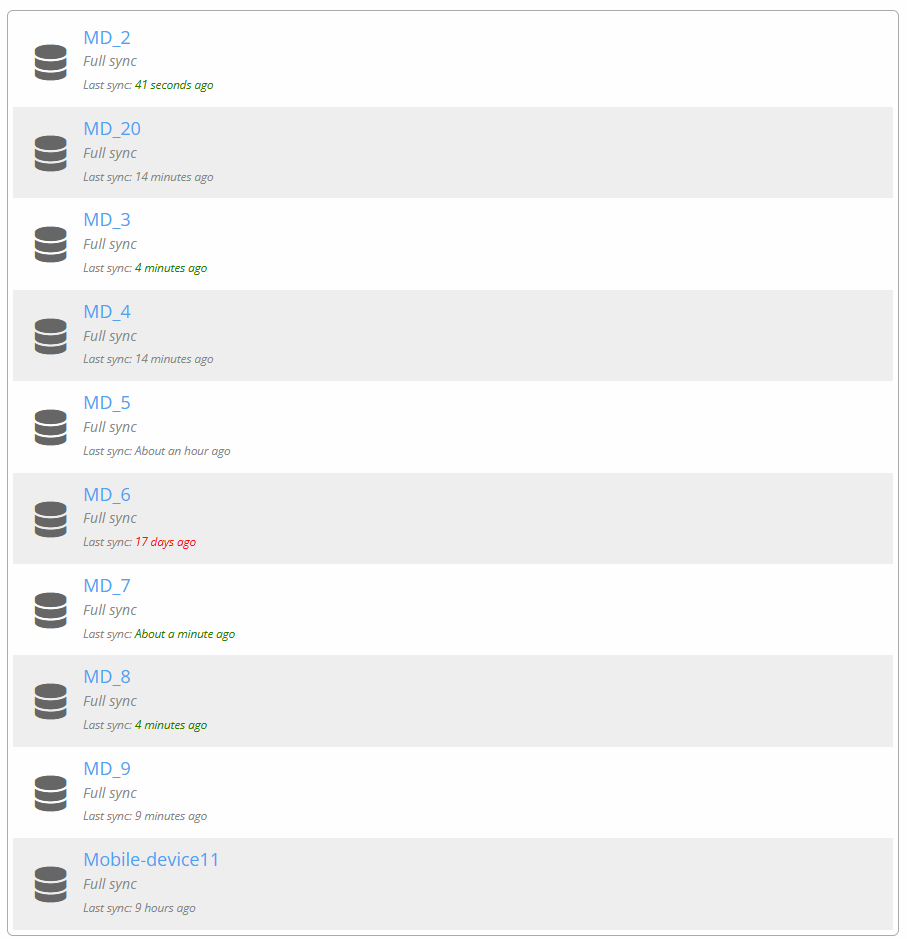
How it works:
- Each location runs IncoPOS locally (works offline)
- IncoCloud syncs changes bi-directionally
- Sync happens automatically when online
- Conflict resolution handled intelligently
Use cases:
- Retail chains with multiple stores
- Restaurant groups sharing centralized menus
- Warehouses coordinating inventory transfers
- Franchises with corporate oversight
💾 Continuous Backup
Your data is automatically backed up to IncoCloud servers every time a change occurs. Never lose critical business information.
Features:
- Incremental backups (only changed data)
- Encrypted data transfer
- Remote data wipe for stolen devices
Benefits:
- Recover from hardware failures instantly
- Migrate to new hardware effortlessly
- Compliance with data retention regulations
🌐 Remote Database Access
Access your business data from anywhere without VPN. Perfect for accountants, managers, and business owners who need visibility on the go.
Setup is simple:
- Install IncoPOS on any computer
- Select “Connect to IncoCloud Database”
- Enter your credentials
- Choose read-only or read-write access
Perfect for:
- Accountants reviewing daily sales
- Managers monitoring inventory levels
- Business owners checking reports
- Headquarters overseeing franchises
🔌 REST API & Integrations
Connect IncoPOS with your existing business tools through the IncoCloud REST API. Build custom integrations or use pre-built solutions
Integration possibilities:
- E-commerce: WooCommerce, Magento
- Custom apps: Build with Python, JavaScript, C#, PHP
Learn more:
Common Use Cases
📦 Multi-Store Retail Chain
“We have 12 clothing stores across the country. IncoCloud keeps our inventory synchronized in real-time. When a customer asks if we have their size, we can check stock at all locations instantly.”
— Retail Store Owner, Sofia
What they use:
- Multi-location sync for inventory
- Transfer orders between stores
- Centralized reporting from headquarters
- API integration with their e-commerce site
🍽️ Restaurant Group
“We run 5 restaurants with the same menu. When we update prices or add new dishes, IncoCloud syncs it to all locations automatically. Our accountant can access sales data without bothering our managers.”
— Restaurant Group Manager, Varna
What they use:
- Centralized menu management
- Real-time sales reporting
- Read-only access for accountant
- Continuous backup for compliance
🛒 Retail + E-commerce
“Our WooCommerce store and physical shop share the same inventory. When someone buys online, our in-store inventory updates within seconds. No more overselling!”
— Electronics Retailer, Plovdiv
What they use:
- WooCommerce API integration
- Real-time inventory sync
- Online orders imported to IncoPOS
- Unified customer database
View WooCommerce integration guide →
Getting Started with IncoCloud
Step 1: Sign Up
- Visit incocloud.com
- Click “Log In” and then “Create new login”
- Complete registration and confirm email
Step 2: Configure IncoPOS
- Open IncoPOS on your computer or Android device
- Go to Edit → Administration → IncoCloud
- Enter your IncoCloud email and password
- Choose “Add database” to create a new group and upload all data
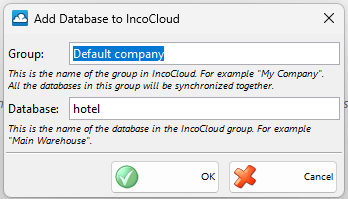
Step 3: Verify Synchronization
- Make a test change (add a product, create a sale)
- Check IncoCloud portal to verify last synchronization time
- If you have multiple locations, verify the change syncs to other locations
💡 Pro Tip: Start with a single location and test thoroughly before adding more. This helps you understand the sync process and troubleshoot any issues easily.
Pricing Plans
Technical Specifications
System Requirements
- Internet connection: Required for synchronization (IncoPOS works offline, syncs when connection available)
- Supported platforms: Windows, Linux, macOS, Android
- Database: MySQL, Microsoft SQL Server, or SQLite (local)
Security & Compliance
- Authentication: tokens for API access
- GDPR compliant: Data stored in EU servers (Bulgaria)
- Remote wipe: Available for stolen/lost devices
Data Synchronization
- Sync frequency: Up to a second after a change was completed
- Conflict resolution: First write to the IncoCloud server wins
- Bandwidth usage: Minimal (only delta/changes transmitted)
- Offline capability: Full IncoPOS functionality when offline, auto-sync when reconnected
Frequently Asked Questions
Do I need IncoCloud to use IncoPOS?
No, IncoPOS works perfectly as a standalone system. IncoCloud is optional and adds multi-location sync, cloud backup, and API integration capabilities.
What happens if my internet connection drops?
IncoPOS continues working normally. All sales, purchases, and operations function offline. When internet reconnects, IncoCloud automatically syncs all changes that occurred while offline.
Can I sync only specific data (not everything)?
No. All the data is backed up so you can safely restore it later in full.
How secure is my data?
Very secure. Data is encrypted during transmission and at rest. IncoCloud servers are located in EU data centers compliant with GDPR regulations. You can also enable remote wipe for lost/stolen devices.
Can I use the API without a paid IncoCloud subscription?
Yes, API access requires an active IncoCloud group. The API key is tied to an IncoCloud group in your account.
Do you offer a free trial?
Yes, we offer a 14-day free trial with one cloud credit. No credit card required. Sign up here.
Next Steps
📚 Learn More
🚀 Get Started
💬 Need Help?
- Email: office@incopos.com
- Phone: +359 878 223 860
- API Support: support@incopos.com