
Voiding, called annulling in the program, cancels a saved Debit Note. The items return to the stock, the payments of the debit note are removed and its document number becomes free. You cannot undo this. To change a saved debit note, annul it and issue a new one.
Annul a debit note
- Go to Operations → Notices → Annul Debit Note…. The Debit Note – Select Document window opens.
- Find the document with Date: and Filter.
- Select it. To select several documents use Ctrl+click, or Shift and the arrow keys.
- Click Annul or double-click the row.
- Answer Yes to “Are you sure you want to annul this debit note?”.
The document leaves this list and the Debit notes report. A record of the annulment stays in Reports → Administration → Application Log….
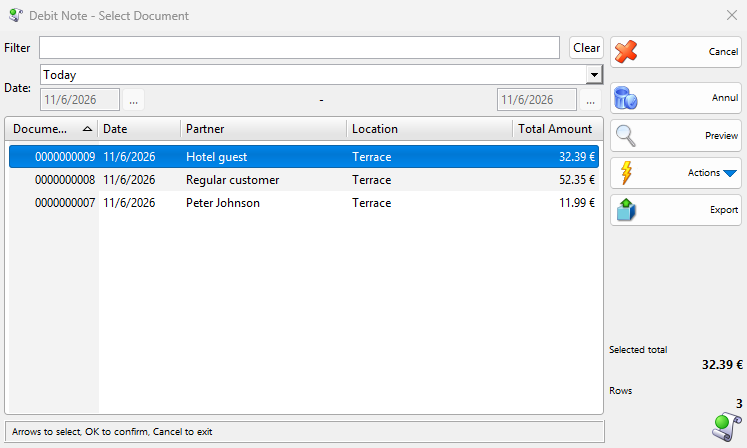
The Select Document window
The list shows Document No., Date, Partner, Location and Total Amount. Total Amount needs Show totals in the choose operations dialogs (slower loading) in Tools → Settings…. Users without the Manage operators and view their operations permission see only their own documents.
Filter searches the number, partner and location. Date: sets the period and the window remembers it. Clear empties the filter and sets the period back to Today. Preview shows or hides the selected document.
What annulling changes
| Area | What happens |
|---|---|
| Stock | The quantities return to the location of the debit note. With lots, they return to the lot of the row. Rows with an item marked Non-inventory or service change nothing. |
| Prices | The purchase and sale prices of the items do not change. |
| Payments | All payments of the debit note, paid and due, are removed, so what the customer owed for it disappears. A payment made with Use payments we owe stays on the other document. Check it in Payments. |
| Cash book | The payment leaves the Cash book, and the balance goes back to what it was before the note. |
| Document number | The number becomes free. If it was the highest issued number, the next invoice, debit note or credit note gets it. Otherwise numbering continues after the highest number, and you can reuse the number by entering it in Number: of a new document, which requires the Edit document number permission. With Document numbers per locations the highest number of the location counts. |
| Invoice | The invoice does not change. |
| Printing | Nothing is printed. |
Troubleshooting
| Problem | Solution |
|---|---|
| “You don’t have access to annul operations that far in the past!” | The document is older than Allowed operations modification: allows for your user. Ask an administrator to change it in Edit → Users…. |
| “Annulling operations with locations not managed by the current database is not allowed!…” | Another database manages the location. If the message is a question, Yes annuls the document here and asks that database to annul the operation. Otherwise annul it from that database. |
| The debit note is not in the list | Widen the period in Date: and clear Filter. If it belongs to another user, you need the Manage operators and view their operations permission. |
| Annul Debit Note… is not available | Ask an administrator to allow it for your user in Edit → Administration → Permissions…. |
FAQ
How do I annul a debit note received from a supplier?
Use Operations → Notices → Annul Received Debit Note…. It removes only the document, because receiving a debit note does not change the stock or the payments.
Related pages
- Debit Note
- Void Credit Note
- Reprint Debit Note
- Debit notes report (Reports → Notices → Debit Notes…)
- Void Issued Invoice