
The Translink REST processor works with a card terminal through the Translink service, which runs on the computer and connects the terminal. It takes the card payments of sales, refunds returns and credit notes by voiding the card payment of the original sale, and voids a card payment when it is deleted. Ask the provider for the Translink service, its address and the terminal ID. The common fields and the steps are in Adding, editing and deleting payment processors.
Settings
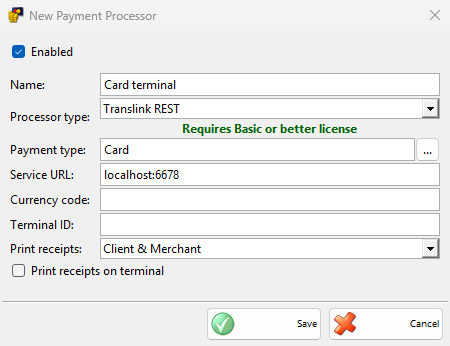
| Field | What it does |
|---|---|
| Service URL: | The address of the Translink service, localhost:6678 by default, which is the service on the same computer. It is required. |
| Currency code: | The currency code sent to the terminal. When it is empty, the code of the main currency is sent. |
| Terminal ID: | The ID of the terminal. It is required. |
| Print receipts: | Which receipts of the terminal are printed, Client & Merchant by default. |
| Print receipts on terminal | Selected, the terminal prints the receipts. Cleared, the default, IncoPOS prints them on the device with Print customer orders in Devices. |
Taking a payment
- Save a sale and choose a payment type of the processor in the Payment window, then click OK.
- The Process Card Payment window opens and the terminal asks for the card. The window has no Cancel: to stop the payment, press the red key of the terminal.
- When the terminal approves the payment, the receipts are printed, the window closes and the sale is saved.
Payments of other documents are saved without the terminal.
Without a Basic or better license, IncoPOS shows the license message once and saves the payments without the terminal.
Refunds and voids
- Return and credit note: the refund voids the card payment of the original sale on the terminal, so the original sale must have a card payment of this terminal with the same amount. When you save the document, the terminal voids that payment. A refund cannot be taken back.
- Deleted payment: when a card payment taken by the terminal is deleted, for example when the sale is annulled, or when the sale could not be saved after the card was charged, the terminal voids the payment. If the void fails, the payment is not deleted.
At the end of the day
A manager end of day report can run Credit card payments reconciliation – Translink and Credit card payments report – Translink. Select them in Edit End of Day Reports.
Troubleshooting
| Message | Solution |
|---|---|
| “Unable to connect to the payment terminal!” | The Translink service does not answer. Check that it runs and check Service URL:. |
| “Unable to unlock the payment terminal!” | The service did not start the payment. Check Terminal ID: and the terminal. |
| “Card payment was aborted!” | The red key of the terminal was pressed. Take the payment again. |
| “Payment not authorized!” | The card or the bank refused the payment. Ask for another card or another payment type. |
| “The original sale was not paid by card on this terminal, so the amount cannot be refunded to the card!” | Refund the return with another payment type, for example cash. |
| “The returned amount differs from the original card payment and cannot be refunded to the card!” | Only the whole card payment can be refunded. Return the whole amount, or refund with another payment type. |