
The INPAS Smart Sale processor works with an INPAS card terminal that runs Smart Sale, connected to a serial port of the workstation. It takes the card payments of sales, refunds the card payments of returns and voids a card payment when it is deleted. Ask the bank for the terminal ID. The terminal reaches the bank through the network connection of the computer, so the workstation needs internet access. The common fields and the steps are in Adding, editing and deleting payment processors.
Settings
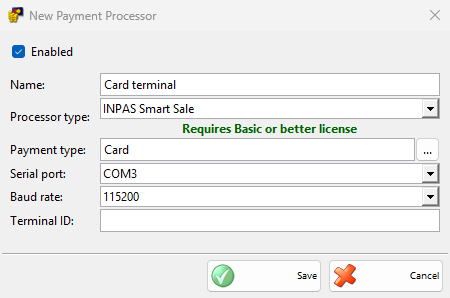
| Field | What it does |
|---|---|
| Serial port: | The COM port of the terminal. |
| Baud rate: | The speed of the port, 115200 by default. It must match the terminal. |
| Terminal ID: | The ID of the terminal from the bank. Only the first 15 characters are sent. It is required. |
Taking a payment
- Save a sale and choose a payment type of the processor in the Payment window, then click OK.
- The Process Card Payment window opens and the terminal asks for the card. The amount is sent in the main currency. Cancel stops waiting.
- When the terminal approves the payment, the sale is saved and the receipts of the terminal are printed on the device with Print customer orders in Devices.
Payments of other documents are saved without the terminal.
Without a Basic or better license, IncoPOS shows the license message once and saves the payments without the terminal.
Refunds and voids
- Return: when you save a return paid back with a payment type of the processor, the terminal refunds the amount to the card and its receipts are printed. If the refund fails, IncoPOS shows “Payment was cancelled or failed. Please try again.” and the return is not saved.
- Deleted payment: when a card payment taken by the terminal is deleted, for example when the sale is annulled, or when the sale could not be saved after the card was charged, the terminal voids the payment. If the void fails, the payment is not deleted.
At the end of the day
A manager end of day report can run Credit card payments reconciliation – INPAS, which sends the settlement to the terminal and prints its receipt. Select it in Edit End of Day Reports.
Troubleshooting
| Message | Solution |
|---|---|
| “Transaction was declined!” | The bank refused the card. Ask for another card or another payment type. |
| “Transaction was aborted!” | The payment was stopped on the terminal. Take it again. |
| “Connection failed!” | The terminal could not reach the bank. Check the internet connection of the workstation. |
| “Transaction could not be completed!” | The terminal reported an error. Try again, and call the bank if it repeats. |