
The Payment Server processor lets a workstation use the card terminal of another workstation. It sends each payment of its payment types to the other workstation, whose Payment Server takes it with the processor of that workstation and sends back the result. The request goes through the database, so both workstations work with the same database, and IncoPOS must be open on the workstation with the terminal. The common fields and the steps are in Adding, editing and deleting payment processors.
Set up the two workstations
- On the workstation with the terminal, add the processor of the terminal, for example Datecs Pay, and a Payment Server in Edit → Administration → Servers… with an Address:, for example 01.
- On each other workstation, add a Payment Server processor with the same Address: and the same payment types.
Settings
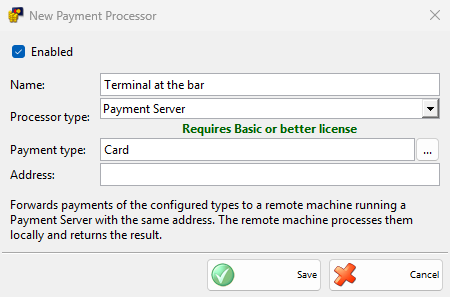
| Field | What it does |
|---|---|
| Address: | The address of the Payment Server on the workstation with the terminal. A one-digit address is read with a leading zero, so 1 and 01 are the same server. It is required. |
Taking a payment
- Save the document and choose a payment type of the processor in the Payment window, then click OK.
- The Process Card Payment window shows “Processing on remote device” and “Expected amount:”, and the terminal of the other workstation asks for the card.
- When the other workstation sends back the approval, the window closes and the document is saved.
The processor sends the paid payments of every document. The processor of the other workstation decides which of them go to the terminal, as described on its own page. IncoPOS waits up to 3 minutes for the answer. Cancel stops waiting.
Without a Basic or better license, IncoPOS shows the license message once and saves the payments without sending them.
Troubleshooting
| Message | Solution |
|---|---|
| “The remote device did not respond in time.” | Check that IncoPOS is open on the workstation with the terminal, that its Payment Server is enabled and has the same Address:. |
| “The remote device reported a payment failure. …” | The terminal did not take the payment. The rest of the message is the reason from the other workstation. |
| “Payment Server address is not configured.” | Enter Address: in the processor. |