
A print server lets several workstations print their receipts on one printer. The workstation with the printer runs a Print Server server, and the other workstations send their receipts to it through a Print Server device. All the workstations must work with the same database. The server window itself is described in Adding, editing and deleting servers, and the list of servers in Servers.
Set up the server on the workstation with the printer
- Set up the printer itself in Devices, as for local printing.
- Go to Edit → Administration → Servers… and click New.
- Select Print Server in Server type:. Logical address: gets 1 and Scan interval (seconds): gets 3.
- Change the Name: if you like and click Save.
The server prints only while IncoPOS is open on this workstation.
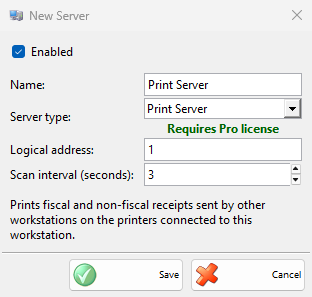
| Setting | What it does |
|---|---|
| Logical address: | The address that the workstations use to reach this server. Give each print server in the database its own address. The window checks only the servers of this workstation. |
| Scan interval (seconds): | How often the server checks the database for receipts to print. |
Set up the other workstations
- On each workstation that prints through the server, go to Edit → Devices… and click New.
- Select the Print Server model.
- Enter the same Logical address: as the server.
- Select Print cash receipts and the other functions you need, and click OK.
The workstation then works as with its own printer: the receipts, the reports and the cash registration go to the printer of the server.
Troubleshooting
| Problem | Solution |
|---|---|
| Receipts do not print through the print server | Check that IncoPOS is open on the server workstation with the same database, that the server is enabled and licensed, and that the device on the other workstation uses the same Logical address:. |
| Nothing prints although the settings match | The server does not start when its own workstation has an enabled Print Server device with the same address. Disable that device or give the server another address. |