
The Access Control Manager server connects IncoPOS with door and turnstile access controllers. When a cashier sells an item that is an access card, for example a monthly gym pass, the server asks for the card, enables it on the controllers and disables it again when its subscription ends. The list of servers is in Servers, and the fields that every server has are in Adding, editing and deleting servers.
What you need
- A Pro license on the workstation that runs the server.
- The access controllers, set up and enabled in Devices on the same workstation. Their time schedules are set with Time schedules… in the device window.
- A card scanner that types the card number like a keyboard and ends it with Enter.
- Items that sell the cards. On the Special tab of the item, add Access controller card and Subscription length. Add Access controller schedule to open the doors only in one time schedule of the controllers.
Set up the server
- On the workstation where the cards are sold, go to Edit → Administration → Servers… and click New.
- Select Access Control Manager in Server type:. Logical address: gets 1 and Scan interval (seconds): gets 10800.
- Change the Name: if you like and click Save.
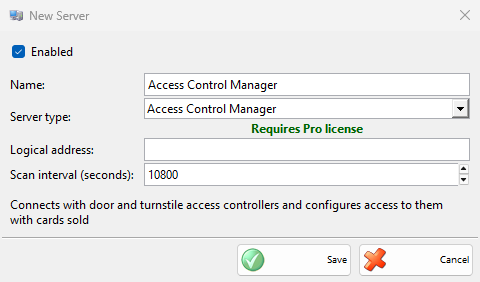
| Field | What it does |
|---|---|
| Logical address: | A number saved with each card that this server enables. The server disables only the cards with its own address, so two servers on different workstations do not touch each other’s cards. A text that is not a number counts as 1. |
| Scan interval (seconds): | How often the server looks for cards whose subscription has ended. 10800 seconds is 3 hours. The first check runs 5 seconds after the server starts. |
How it works
- The cashier sells the card item and finishes the sale as usual.
- For each card in the sale, the Process Access Card window opens with the item name and “Please scan the customer’s access card in the card scanner.”. The cashier scans the card. A quantity of 3 asks for 3 cards.
- The card number is saved with the sale, and “Enabling Card…” shows while the server enables the card on every enabled access controller of the workstation, with the time schedule of the item.
- At each scan interval, the server disables on the controllers the cards whose Subscription end is before today, and marks them as done, so each card is disabled once.
A scan shorter than 8 characters is ignored and the window keeps waiting. Cancel skips that card: the sale stays, but the card is not enabled. The cards are enabled only by a sale finished on the workstation that runs the server.
Troubleshooting
| Problem | Solution |
|---|---|
| The Process Access Card window does not open after the sale | Check that the server is enabled on this workstation, that the workstation has a Pro license and that the item has Access controller card. |
| The scanned card does not open the door | Check that the controller is enabled in Devices on this workstation and connected, and that the time schedule of the item allows the current time. |
| A card still opens the door after its subscription ended | The card is disabled at the next scan interval, after its end date. A card sold from an item without Subscription length has no end date and stays enabled. |