
The SumUp – Solo Card Reader processor sends the card payments of sales to a SumUp Solo card reader through the SumUp service on the internet. The reader needs no cable to the workstation, and the workstation needs internet access. You need a SumUp merchant account and a Solo reader. The common fields and the steps are in Adding, editing and deleting payment processors.
Settings
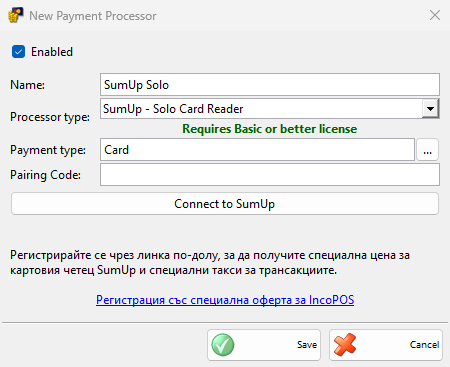
| Field | What it does |
|---|---|
| Pairing Code: | The code that the Solo reader shows for pairing. It is required. When you save, IncoPOS pairs the reader with your SumUp account and names it after Name:. A changed code pairs the reader again. |
| Connect to SumUp | Opens the SumUp sign-in in the browser. After you allow the access, the text next to the button changes from Not connected to Connected as: and your merchant code. The button then reads Reconnect to SumUp. |
| The offer and its link | A text in Bulgarian and the link Регистрация със специална оферта за IncoPOS, which opens the SumUp sign-up page with a special price for the reader and special fees. |
Connect the reader
- In the New Payment Processor window, select SumUp – Solo Card Reader, enter the Name: and select the Payment type:.
- Click Connect to SumUp, sign in to SumUp in the browser and allow the access. The window waits up to 3 minutes and shows “Waiting for SumUp authorization in browser…” meanwhile.
- Enter the Pairing Code: from the Solo reader and click Save.
The connection is saved with the processor, so click Save in the same window after you connect. IncoPOS renews the access by itself while the processor is used.
Taking a payment
- Save a sale and choose a payment type of the processor in the Payment window, then click OK.
- The Process Card Payment window shows “Sending payment to Solo reader…” and then “Waiting for customer to tap or insert card on the reader…”.
- When the payment is approved, the window closes and the sale is saved. The card payment details are added at the end of the cash receipt.
The customer has 70 seconds to pay. Cancel counts down and becomes available after 30 seconds. After a cancel or a timeout, IncoPOS cancels the payment on the reader and checks for up to 30 seconds whether the customer paid just before: a payment that went through is saved.
The main currency must be one of these, and the payment must be at least the amount next to it: EUR 1, BGN 2, CZK 30, DKK 8, HUF 1, NOK 10, PLN 1, RON 5, SEK 10. Payments of other documents and refunds are saved without the reader.
Without a Basic or better license, IncoPOS shows the license message and the payment is not taken.
Troubleshooting
| Message | Solution |
|---|---|
| “Please connect to SumUp before saving.” | Click Connect to SumUp before Save. |
| “Failed to pair the reader. The pairing code may be expired or invalid. Please get a fresh code from the Solo device.” | Show a new pairing code on the reader, enter it and save again. |
| “SumUp is not connected. Please connect from the payment processor settings.”, “Failed to refresh SumUp access token. Please reconnect from the payment processor settings.” | Open the processor, click Reconnect to SumUp and save. |
| “The Solo reader is not paired. Please open the payment processor settings and save to pair it.” | Enter the Pairing Code: and save. |
| “Currency … is not supported by SumUp.”, “The minimum SumUp amount for … is ….” | The main currency or the amount is not accepted. Take the payment with another payment type. |
| “The Solo reader is busy with another payment. Finish or cancel it on the reader and try again.” | Finish or cancel the payment on the reader, then take the payment again. |
| “Payment was declined or cancelled on the reader.” | Ask for another card or another payment type. |
| “The Solo reader may still complete the payment. Check it in the SumUp app before taking the payment again.” | IncoPOS could not confirm the result. Check the payment in the SumUp app, so that the customer does not pay twice. |