
The Bank Transfer (IncoCloud Bank Connector) processor pays a document with a bank transfer that the IncoCloud Bank Connector service downloaded from your bank. When you save a payment of its payment type, IncoPOS opens the bank transfers and you select the transfer that pays the document. The processor needs no license of its own, only the Bank Connector service. The common fields and the steps are in Adding, editing and deleting payment processors.
Settings
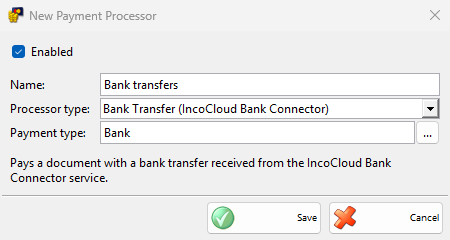
The type has only the common fields. Select your bank transfer payment type in Payment type:.
Paying with a transfer
- Save the document and choose a payment type of the processor in the Payment window, then click OK.
- The Bank Transfers window opens with the transfers of the same direction: incoming transfers for a payment you receive and outgoing transfers for a payment you make. The transfers that match the document best are at the top.
- Select the transfer and click OK. The payment takes the free amount of the transfer, up to the amount of the payment, and the currency of the transfer.
- If the partner of the document does not have the IBAN or the company ID of the sender, IncoPOS asks whether to save it in the partner, for example “Remember IBAN … for partner …?”. The default partner is never changed.
Cancel in the Bank Transfers window leaves the payment unsaved, and the Payment window stays open. When the transfer has less free money than the payment, the Payment window stays open with the rest still to pay.
The processor works with every document. A payment you receive needs the Incoming transfers permission and a payment you make needs Outgoing transfers, both under Bank Transfers View in Permissions. Without the permission, the payment is saved without a transfer. The refund of an advance payment is also saved without a transfer.
Troubleshooting
| Message | Solution |
|---|---|
| “This transfer is already fully used.” | Other payments already use the whole transfer. Select another transfer. |
| “The remaining amount of this transfer is already used by other payments of this document.” | Another new payment of the same document already takes the rest. Select another transfer. |
| “The bank account field of the partner is full and cannot hold one more IBAN.” | Remove an old IBAN from the partner if you want to save the new one. |
| The transfer is not in the list | Refresh the transfers in the window, check the date range and the status filter, and check that the transfer has the right direction. |