
Currency Switch makes the secondary currency the main currency of the database and converts all prices, documents and payments into it, for example from leva to euro. The old main currency becomes the secondary currency. Open it with Edit → Administration → Currency Switch…. It needs a Pro license and only an owner can run it. On a large database the switch can take several hours. The currencies themselves are set in Currencies.
Before you start
- In Currencies, open the new currency, select Use as a secondary currency and enter its rate in Rate:, for example 1.95583 for EUR in a database in BGN. The switch divides every amount by this rate.
- Ask the other workstations to stop working with the database. The switch converts the documents of each day once, so a document saved during the switch can stay in the old currency.
- Keep a copy of the database. The switch can make one, see below.
Run the switch
- Go to Edit → Administration → Currency Switch….
- Answer “Before switching currencies all tabs have to be closed. Do you want to close all open tabs?” with Yes.
- Enter your password in Confirm Your Password and click OK.
- In the Switch Primary and Secondary Currency window, check that both currency lines are green.
- To keep a copy of the database as it is now, select Copy database before switching.
- Click Start. The progress window shows the step and the day being converted.
- Wait for “Currency switch completed successfully”.
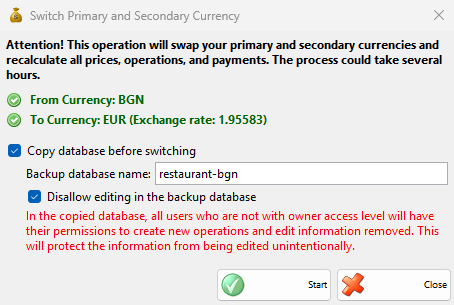
| Field | What it does |
|---|---|
| From Currency | The main currency now. |
| To Currency | The secondary currency and its rate. It is red with “Not configured or invalid exchange rate” when no currency has Use as a secondary currency or its rate is 1. Start works only when both lines are green. |
| Copy database before switching | Copies the whole database before the switch starts. |
| Backup database name: | The name of the copy. It proposes the name of the database followed by the code of the main currency. A database with this name must not exist. |
| Disallow editing in the backup database | In the copy, removes from all users who are not owners the permissions to make operations and change data, so the old data is not changed by mistake. |
| Start | Starts the switch. When a stopped switch waits to be finished, the button is Resume. |
| Close | Closes the window without a change. |
What the switch changes
| Where | Result |
|---|---|
| Main currency | Takes the code, description, sign, banknote and coin names and coins ratio of the secondary currency. Its rate stays 1. |
| Secondary currency | Takes the code, description, sign, names and ratio of the old main currency. Its rate becomes 1 divided by the old rate, for example 0.511292. |
| Other currencies | Their rates are divided by the rate. |
| Partners | A partner with a preferred currency keeps the same currency. |
| Items | The purchase price and all sale prices, from the wholesale and retail price to price group 8. |
| Location prices | The prices of the items set for a location. |
| Stock | The prices of the quantities in stock in each location. |
| Promotions | The prices of the items in the promotions. |
| Price rules | A rule that sets a fixed price, or adds or subtracts an amount from a price, gets the amount converted. |
| Documents | The prices and the VAT amounts of the rows of all documents, the original prices saved with the rows, the commissions and the exchange rate saved with each document. The quantities do not change. |
| Payments and advance payments | The amounts and the exchange rate saved with each payment. |
| Cash book | The amounts of the cash entries. |
The VAT rates and the number of decimals set in Settings do not change.
No rounding
The switch never rounds. Each amount is divided by the rate and kept with all its decimals. A price of 10.00 BGN becomes 5.112918811962185 EUR and the program shows 5.11 €, rounded to the decimals set in Settings. Because nothing is lost, a second switch back with the new rate of the old currency gives 10.00 BGN again. If you want round prices in the new currency, change them after the switch, for example in Change prices.
Stop and resume
Click Stop in the progress window to pause the switch. The button shows Stopping… until the part being converted is saved, then the program shows “Currency switch has been stopped. You can resume it later from the same menu.”. The days are converted from the newest to the oldest and each day is saved on its own, so the work already done stays.
To finish the switch, open Edit → Administration → Currency Switch… again on any workstation and click Resume. The window shows the currencies of the switch that waits, and the copy options are dimmed: the copy is not made again. After an error, the day that failed is not saved. Remove the cause of the error and resume.
Permissions
Currency Switch… is set in Edit → Administration → Permissions…, under Administration. It is not allowed by default for managers, administrators and operators. Even when it is allowed, only a user with the owner level can run the switch.
Troubleshooting
| Message | Solution |
|---|---|
| “Only owners may switch currencies.” | Log in as a user with the owner level. |
| “The Currency Switch function requires a Pro license! To use this feature please purchase a license.” | The switch needs a Pro license. |
| To Currency: Not configured or invalid exchange rate | In Currencies, select Use as a secondary currency on the new currency and enter its rate. |
| “Please, enter the name of the new database!”, “The entered database name contains invalid characters!” | Enter a valid Backup database name:. |
| “A database with the name of “…” already exists!” | Enter another Backup database name:. |
| “An error occurred while performing database copy!” | The copy failed and the switch did not start. Remove the cause and start again. |
| “An error occurred while switching currencies: …” | The switch stopped. The days already converted stay. Remove the cause and resume. |
FAQ
Can I switch back?
Yes. After the switch, the old main currency is the secondary currency with the rate 1 divided by the old rate. Run Currency Switch… again: because the first switch did not round, the amounts come back to their old values.