
A credit cash order is the printed document for money paid out. You print it for a row of the Cash Book with an expense turnover type. For money received, use the Debit cash order.
Open the Credit Cash Order window
The turnover type of the row decides which cash order opens. Expense types, and the types based on them, open this window. You can open it in these ways:
- In the Cash Book select a row and click Cash Order.
- In the New Cash Book Entry or Edit Cash Book Entry window select Print cash order and click OK.
- In the New Cash Book Transfer window select Print cash order and click OK. The credit cash order of the Money Out row opens first, then the debit cash order of the Money In row.
- In the New Money Audit window select Print cash order. It opens if you counted less than the expected amount.
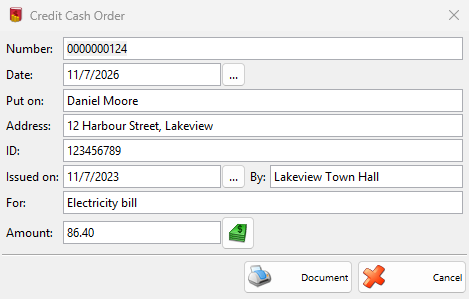
Fill in the window
| Field | What to enter |
|---|---|
| Number: | The operation number of the row is filled in. |
| Date: | The date of the row is filled in. Press F4, double-click or use the … button to pick a date from the calendar. |
| Put on: | The person who receives the money. |
| Address: | The address of this person. |
| ID: | The number of the identity card. |
| Issued on: | The date of issue of the card. You can pick it from the calendar in the same way. |
| By: | Who issued the card. |
| For: | The reason for the payment. The description of the row is filled in. |
| Amount: | The amount of the row is filled in. The button next to the field shows a panel with notes and coins, and what you add there replaces the amount. |
The window does not require any of the fields.
When you click Document, each workstation remembers Put on:, Address:, ID:, Issued on: and By: and fills them in the next time. Check them when the money goes to another person.
Print the order
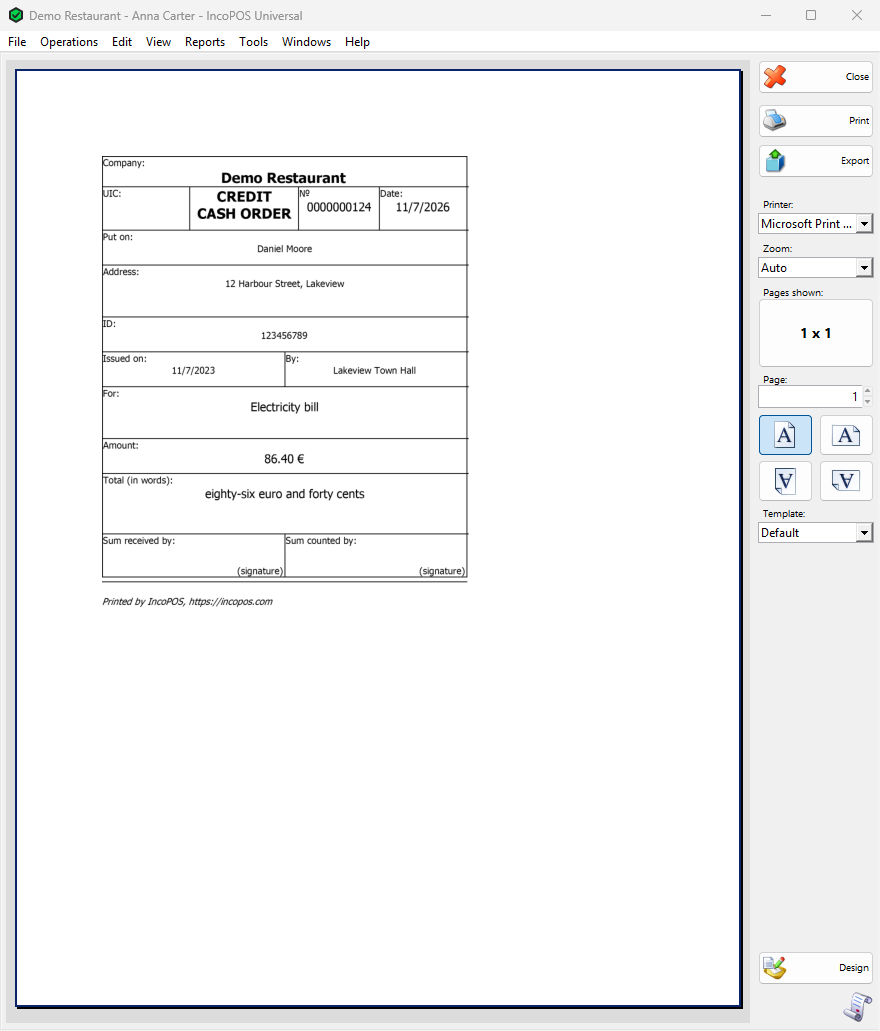
- Click Document. The print preview opens.
- Print the order from there and sign it.
Cancel closes the window without printing. The row stays in the Cash Book in both cases. What you change in this window goes only to the printed form: the program does not save the order and does not change the row. To change the row, use Edit in the Cash Book.
The printed form
The form shows the name of the default company from Company information and each value of the window under its label, including ID:, Issued on: and By:. It also shows the amount in Total (in words):. It ends with the signature lines Sum received by: and Sum counted by:. To change the layout, use Document Designer.
Troubleshooting
| Problem | Solution |
|---|---|
| “This is a free version of the Cash Book! To print cash orders please purchase a license.” | Printing cash orders needs a license for the Advanced Operations module. |
| Cash Order is inactive | Select a row. A row with a turnover type based on Unknown has no cash order. Your user also needs the Edit permission of the Cash Book. |
FAQ
Can I print a credit cash order for the payment of a purchase?
Yes. Select its row in the Cash Book. Payments of purchases and returns get Expense (purchase) by default.
Can I print the same order again?
Yes. Select the row and click Cash Order. The window opens with the values of the row and the remembered fields. Changes made for an earlier print are gone.