
The Postbank – Mellon processor sends the card payments of sales to a Postbank card terminal that uses the Mellon cash register protocol, connected to a serial port of the workstation. Ask the bank for the cash register (ECR) number, the operator number and the port settings of the terminal. The common fields and the steps are in Adding, editing and deleting payment processors.
Settings
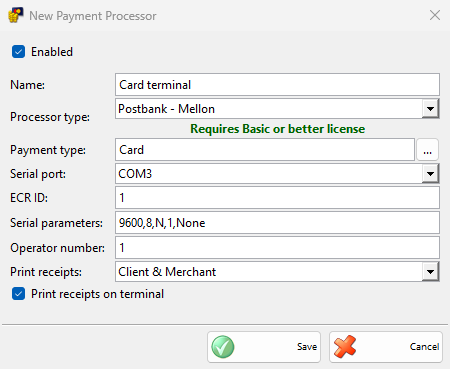
| Field | What it does |
|---|---|
| Serial port: | The COM port of the terminal. |
| ECR ID: | The cash register number set in the terminal, 1 by default. It is required. |
| Serial parameters: | The port settings, separated by commas: speed, data bits (5 to 8), parity (N, E, O, M or S), stop bits (1, 1.5 or 2) and flow control (None, XOnXOff, RTS or RTSXOn). 9600,8,N,1,None by default, which is also used when the field is empty. |
| Operator number: | The operator number sent with each payment, 1 by default. It is required. |
| Print receipts on terminal | Selected by default: the terminal prints its receipts. Cleared, the terminal sends the receipts to IncoPOS. |
| Print receipts: | Which of the receipts sent by the terminal IncoPOS prints, Client & Merchant by default. They are printed on the device with Print customer orders in Devices, the merchant copy first. |
Taking a payment
- Save a sale and choose a payment type of the processor in the Payment window, then click OK.
- The Process Card Payment window opens. The terminal confirms the amount, in the main currency, and asks for the card.
- When the terminal approves the payment, the receipts are printed, the window closes and the sale is saved.
Cancel counts down and becomes available after 30 seconds. When the terminal is busy, IncoPOS tries again a few times before it shows a message. Payments of other documents and refunds are saved without the terminal.
Without a Basic or better license, IncoPOS shows the license message once and saves the payments without the terminal.
At the end of the day
A manager end of day report can run two actions of the terminal. Select them in Edit End of Day Reports.
| Action | What it does |
|---|---|
| Credit card payments reconciliation – Postbank / Mellon | Closes the batch of the terminal. When there were no card payments, it shows “The batch on the bank terminal is empty.”. |
| Credit card payments report – Postbank / Mellon | Prints the totals of the terminal. |
Their receipts follow the same two settings as the receipts of a payment.
Troubleshooting
| Message | Solution |
|---|---|
| “Transaction was declined!” | The bank refused the card. Ask for another card or another payment type. |
| “The payment terminal is busy. Please try again.” | Finish the operation on the terminal and take the payment again. |
| “Payment terminal error: …” | The terminal sent the error code in the message. Give the code to the bank. |
| “Payment terminal internal error!” | Restart the terminal and try again. |
| “Payment terminal communication error!” | The terminal did not answer. Check the cable, Serial port:, Serial parameters: and ECR ID:. |