
Use Edit → Administration → Fiscal Manager… to send single commands directly to a fiscal printer or a sales data controller: read its settings and state, set its date and time, or run a test. It is a service tool for setting up a device and finding a problem. The menu item is disabled until such a device is set up in Devices.
A command acts on the real device. A command that writes data or closes a report cannot be undone, so use only the commands you know.
Send a command
- Go to Edit → Administration → Fiscal Manager…. The Fiscal Manager window opens.
- Select a command in the Command list. To find it, type part of its name in Filter.
- Fill the fields under Input parameters:, if the command has any.
- Click Execute.
- Read the answer under Output parameters: and Status:.
Close closes the window.
Parts of the window
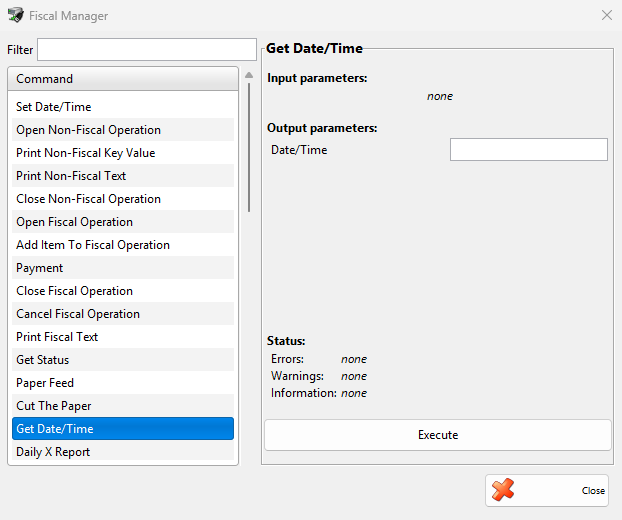
| Part | What it shows |
|---|---|
| Command | The commands that the connected device supports, followed by the test commands. |
| Filter | Shows only the commands whose name contains the typed text. |
| Input parameters: | What the command needs, for example a date, a text or a choice. A command without parameters shows none. |
| Output parameters: | What the device returned, filled after Execute. |
| Status: | The answer of the device in Errors:, Warnings: and Information:. |
The right part of the window changes with the selected command. For example, Get Date/Time has no input parameters and returns the date and time of the device in Date/Time. The list of commands depends on the device, so two devices show different lists.
Test commands
The commands with Meta in their name are tests made of several device commands. They are real operations: Meta Fiscal Simple Test prints a real fiscal receipt with a cash payment, and Meta Fiscal Reports Test prints an X report and a Z report, which closes the fiscal day.
Permissions
Fiscal Manager… has its own entry in Edit → Administration → Permissions…. The Administration menu is closed by default for operators.
Troubleshooting
| Problem | Solution |
|---|---|
| Fiscal Manager… is disabled | No fiscal printer or sales data controller is set up. Check Devices. |
| “An error has occurred while executing command!” | Read Status:. Check the connection and the state of the device, for example the paper or an open receipt. |
| A command is not in the list | The device does not support it. |