
A turnover type says what a payment is for, for example a sale, rent or salaries, and whether it is income or expense. Every payment has one, and the Cash Book filters and sums the payments by it. Use Edit → Payments → Turnover Types… to add, edit and delete the turnover types.
Open the Turnover types window
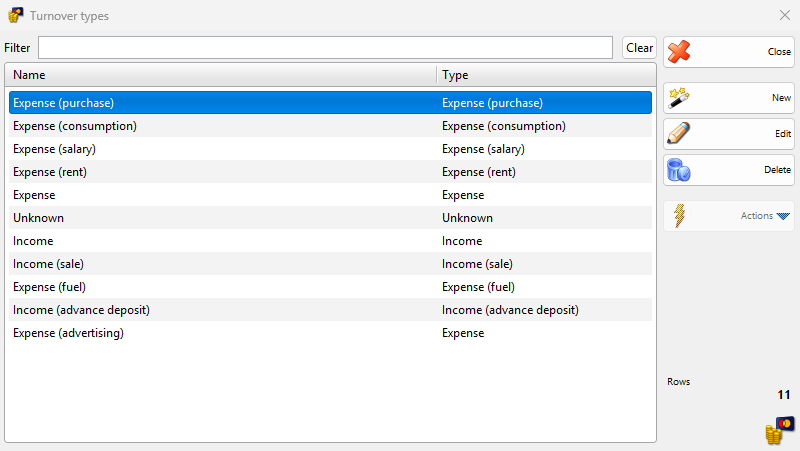
Go to Edit → Payments → Turnover Types…. The Turnover types window opens. The program starts with ten types: Expense (purchase), Expense (consumption), Expense (salary), Expense (rent), Expense, Unknown, Income, Income (sale), Expense (fuel) and Income (advance deposit).
| Control | What it does |
|---|---|
| Filter | Shows only the turnover types whose name contains the typed text. |
| Clear | Clears Filter. |
| Name, Type | The columns of the list. Type is the base type that decides how the program treats the turnover type. |
| New | Opens the New Turnover Type window. |
| Edit | Opens the selected type in the Edit Turnover Type window. A double-click does the same. |
| Delete | Deletes the selected types. See Delete a turnover type. |
| Close | Closes the window. |
Add or edit a turnover type
- Click New, or select a type and click Edit.
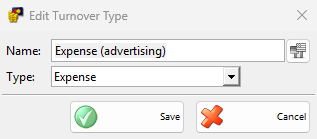
- Enter Name: and select Type:.
- Click Save. Cancel closes the window and nothing changes.
| Field | What it does |
|---|---|
| Name: | Required. This is the name in the Cash Book, the cash windows and the reports. The button next to the field stores the name in other languages. The name may repeat. |
| Type: | One of the ten starting types. A type based on an expense type is an expense, a type based on an income type is income, and a type based on Unknown is neither. |
How the program uses turnover types
| Where | What the turnover type does |
|---|---|
| Payments of documents | A sale gets Income (sale), a purchase and a return get Expense (purchase), and other documents get Income or Expense by the direction of the money. A payment account rule can set another type. |
| Cash Book entries | The type decides if the amount is income or expense. A transfer offers the expense types on the From side and the income types on the To side. |
| Register Cash | The list shows the types for the selected direction. |
| Cash orders | Income opens the Debit cash order, expense the Credit cash order. A type based on Unknown has no cash order. |
Delete a turnover type
- Select one or more types and click Delete.
- Answer “Do you want to delete turnover type “…”?” with OK. For several types the question is “Do you want to delete the selected 2 turnover types?”.
| Case | Message |
|---|---|
| Most of the starting types. You can still rename them. | “Cannot delete turnover type “Expense (rent)”!” |
| The type is used in a payment. | “The turnover type “Expense (advertising)” cannot be deleted, because it is used for payments.” |
Permissions
The Turnover Types… permission under Edit → Payments in Permissions controls the menu item and all changes in the window. It is not allowed by default for operators.
Troubleshooting
| Problem | Solution |
|---|---|
| “Turnover type name cannot be empty!” | Enter Name:. |
| A type is missing from the From or To list of a transfer | Check its Type:. The From side lists only expense types and the To side only income types. |
| Cash Order is inactive for a Cash Book row | The turnover type of the row is based on Unknown, which has no cash order. |
FAQ
How do I track a new kind of expense, for example advertising?
Add a turnover type named for it with Type: Expense, then choose it for the Cash Book entries. The Cash Book can then filter and group by it.
Can sales get another turnover type?
Yes. Add a payment account rule for Sale with the type in Turnover type:.