
The VAT Groups window lists the tax rates of your items. Each item has one VAT group. Open the window with Edit → VAT Groups…. With Use sales tax instead of VAT in Tools → Settings… the menu item and the window are called Tax Groups. To add or change a group, see Adding, editing and deleting VAT Group.
The VAT Groups window
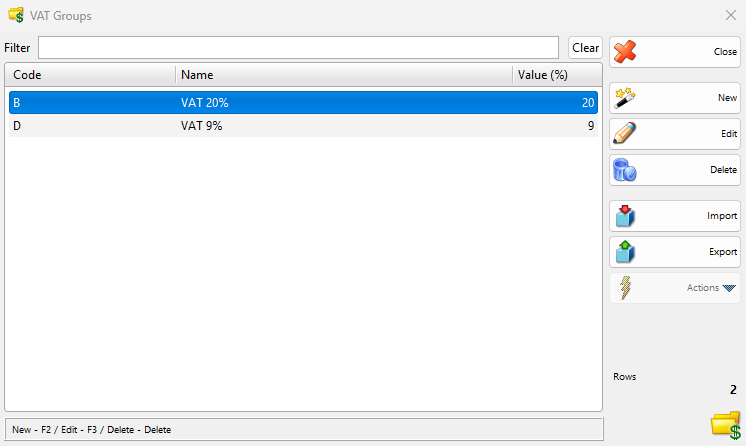
| Control | What it does |
|---|---|
| Filter | Shows only the groups whose code or name contains the typed text. |
| Clear | Clears Filter. |
| New (F2) | Opens the New VAT Group window. |
| Edit (F3) | Opens the selected group. A double-click does the same. |
| Delete | Deletes the selected groups. The Delete key does the same. |
| Import | Opens Import Entities. Choose the format and the file in Import from:, click OK and match the columns of the file with the fields. |
| Export | Opens Export Entities and exports the listed groups. |
| Rows | The number of listed groups. |
Value (%) shows the total rate of the group. For a combined group it includes the rates of its child groups.
Choose a group
The same window opens when you choose a VAT group elsewhere in the program, with the OK and Cancel buttons. Select the group and click OK, or double-click the row. For the item itself, use VAT Group: on the Additional information tab (see Adding, editing and deleting items).
Permissions
All permissions are set in Edit → Administration → Permissions…, under VAT Groups…. The whole entry is not allowed by default for operators.
| Permission | What it allows |
|---|---|
| New | Adding groups. |
| Edit | Changing groups. |
| Preview | Without Edit, the button becomes Preview and opens the group with only a Close button. |
| Delete | Deleting groups. |
| Import, Export | The buttons of the same name. |