
With Auto production, saving a sale of an item that has a recipe creates a production for the quantity the location is missing, as described in Production. Each automatic production depends on the stock and the recipe at the moment the document is saved. Edit → Administration → Recalculate Automatic Productions… goes through a period again, day by day and in the order the documents were saved, and creates the automatic productions that the documents need now.
When you need it
- You corrected a recipe and the past sales should use the corrected ingredients.
- A purchase or a stock-taking was entered later with an earlier date, so the productions of the sales after it were made from the wrong stock.
Before you start
- Work with negative availability in Tools → Settings… → Operations must be on. Otherwise the command stops with “Automatic productions can only be recalculated if the setting “Work with negative availability” is enabled.” Lots need this setting off, so the command cannot be used with lots.
- The command needs a license. Without one it shows “The Recalculate automatic productions function requires a license! To use this feature please purchase a license.”
- The command annuls and creates documents and has no undo. Back up the database first, and run it when nobody saves documents.
Run the recalculation
- Go to Edit → Administration → Recalculate Automatic Productions….
- In Date: choose the period. The window opens on Last Month the first time, and remembers your last choice.
- Set the other fields of the table below.
- Click OK. The work starts at once, with no further question.
- Wait for “The automatic production finished successfully.”
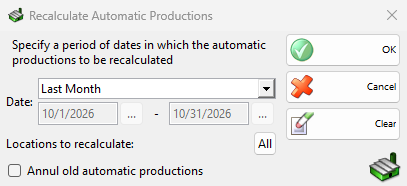
| Field | What it does |
|---|---|
| Date: | The period of the documents. An empty date means from the first or up to the last document in the database. |
| Locations to recalculate: | Click the button to select locations. All means no limit. For a transfer the location it goes out of counts. |
| Transfer missing items from the warehouses configured in the Touch Screen | Shown only when a Warehouse is set on the Touch Screen. Like the Touch Screen, the missing items and ingredients are first transferred from their warehouse, and only what is still missing is produced. With it, all locations are recalculated and the locations button is disabled. |
| Workstations: | Active with the transfer check box. Only the sales of these workstations get transfers. All means every workstation. |
| Annul old automatic productions | Annuls the automatic productions of each day before it produces again. With the transfer check box it reads Annul old automatic productions and transfers and also annuls the automatic transfers of the selected workstations. Without it, the old ones stay and only the quantity that is still missing is produced. |
Clear resets the period. Cancel closes the window and nothing runs.
The Automatic Production… window shows the step, how many documents are done and the time left. Stop ends the work with “The automatic production was aborted by the user!”. The days done so far stay changed, so run the command again for the rest of the period.
What changes
The program reads the stock at the start of the period from the documents before it. Then, day by day, it takes the sales, wastes, write-offs, debit notes, transfers and productions in the order they were saved, and produces what each one is missing at that moment.
| Where | Result |
|---|---|
| Automatic productions in the period | With Annul old automatic productions they are annulled and made again. A new production gets the date of its document, a time one second before the document was saved, and its user and partner. |
| Productions you entered yourself | Not annulled. Their ingredients can get an automatic production if the stock is missing. |
| Recipes | No change. The productions use the recipes as they are now. |
| Stock | Follows the new productions and transfers: the ingredients go out and the products come in. |
| Sales and the other documents | No change, also to the purchase prices on their rows. To give the sales the prices of the new productions, run Recalculate purchase prices afterwards. |
| Transfers | With the transfer check box, transfers from the warehouses are created. A transfer that would wait for approval is not created. |
An item with No auto production or a price rule with Disable automatic production is not produced, as when a document is saved. On a database synchronized with IncoCloud that keeps only its own locations, only those locations are recalculated.
Permissions
The Recalculate Automatic Productions… permission under Administration in Permissions controls the menu item. It is not allowed by default for operators.
Troubleshooting
| Problem | Solution |
|---|---|
| “Automatic productions can only be recalculated if the setting “Work with negative availability” is enabled.” | Turn on Work with negative availability in Settings. |
| “An error occurred while performing auto production!” | The days before the error stay changed. Fix the cause and run the command again for the period. |
| A sale got no production | The location had enough stock at the time of the sale, the item has no recipe, or automatic production is turned off for the item. |
| The old productions are still there next to the new ones | Run the command again with Annul old automatic productions. |
FAQ
Must Auto production be on?
Turn it on before you run the command. With it off, the command still produces the items of the documents, but not their ingredients that have their own recipes.
Can I undo it?
No. Restore the backup, or annul the productions one by one in Edit production.