
Use Edit → Administration → Recalculate Availability… to calculate again the quantity of every item in each location from the documents saved in the database. The program keeps the current quantity of each item in each location as a separate figure, and every saved document updates it. The item lists, the sale windows and the Items in Stock report show this figure. The command writes it again from the documents.
When you need it
The quantity in stock and the documents normally agree. Run the command when they do not, for example:
- Items in Stock shows a different quantity than Availability as of for today. The second report adds up the documents.
- The computer or the database server stopped unexpectedly while people were working.
- IncoPOS support asks you to run it.
The command does not count anything and does not fix wrong documents. If a purchase has a wrong quantity, correct the purchase in Edit → Documents. If the shelf has a different quantity than the program, make a stock-taking.
Before you start
- The command needs a license. Without one it shows “The Recalculate availability function requires a license! To use this feature please purchase a license.”
- Nobody should save documents in the locations you recalculate while the command runs. Choose a time when the shop is closed.
- The program goes through every item in every location, so a large database can take several minutes.
Run the recalculation
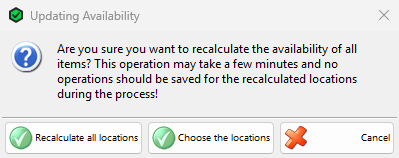
- Go to Edit → Administration → Recalculate Availability…. The window Updating Availability asks “Are you sure you want to recalculate the availability of all items? This operation may take a few minutes and no operations should be saved for the recalculated locations during the process!”
- Click Recalculate all locations, or click Choose the locations, select the locations in the Locations list and click OK.
- Wait for “The recalculation finished correctly.”
Cancel closes the question and nothing changes.
While it runs, the Updating Availability window shows the location being updated, how many items are done and the time left. Stop ends the work with “The recalculation was aborted by the user!”. The items done so far keep their new quantity, so run the command again to finish.
What changes
| Where | Result |
|---|---|
| Quantity of each item in each location | Becomes the total of the saved documents of the item in the location. Deleted items and deleted locations are included. |
| Items with Non-inventory or service | Their quantity becomes 0. |
| Lots | When Item management: works with lots, each lot gets the quantity of its documents, and stock rows that no document explains are removed. |
| Purchase price in the location | With Average price per location, an item whose quantity is corrected also gets the purchase price of the item as its price in the location. Items whose quantity was right keep their price. |
| Documents, payments, sale prices and the purchase prices on the documents | No change. No document is created. |
| Application Log | Records the start and the end, with the location or “All locations”. |
On a database synchronized with IncoCloud that keeps only its own locations, only those locations are recalculated.
Permissions
The Recalculate Availability… permission under Administration in Permissions controls the menu item. It is not allowed by default for operators.
Troubleshooting
| Problem | Solution |
|---|---|
| “An error occurred while recalculating availability.” | The items done before the error keep their new quantity. Run the command again. If the error repeats, send its details to support. |
| The quantity is still not what is on the shelf | The command follows the documents. Make a stock-taking, or correct the document that has the wrong quantity. |
| The menu item is not in the menu | Your user does not have the permission. Ask the owner to allow it in Permissions. |
FAQ
Does the command change my sales or my profit?
No. It changes only the quantities in stock. The documents and their prices stay as they are.
Should I run it regularly?
No. Every saved document already updates the stock. Run it only when the stock and the documents disagree.
Can I undo it?
There is no undo, but the result depends only on the documents. Running it again gives the same quantities.