
The FIBank – Spectra processor sends the card payments of sales to a Fibank SPECTRA card terminal, connected to a serial port of the workstation. Ask the bank for the terminal and the cash register speed set in it. The common fields and the steps are in Adding, editing and deleting payment processors.
Settings
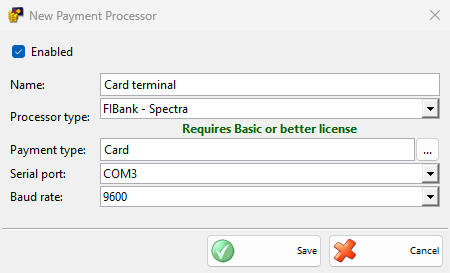
| Field | What it does |
|---|---|
| Serial port: | The COM port of the terminal. The port works with 8 data bits, no parity and 1 stop bit. |
| Baud rate: | The speed of the port, 9600 by default. It must match the cash register speed set in the terminal. |
Taking a payment
- Save a sale and choose a payment type of the processor in the Payment window, then click OK.
- The Process Card Payment window opens and the terminal asks for the card. The amount is sent in the main currency.
- When the terminal approves the payment, the window closes and the sale is saved.
Cancel counts down and becomes available after 30 seconds. After the terminal confirms the request, IncoPOS waits up to 90 seconds for the result. When the terminal was restarted, IncoPOS connects to it again by itself. IncoPOS does not print a terminal receipt for this type. Payments of other documents and refunds are saved without the terminal.
Without a Basic or better license, IncoPOS shows the license message once and saves the payments without the terminal.
Troubleshooting
| Message | Solution |
|---|---|
| “Unable to connect to the bank terminal!” | Check that the terminal is on, the cable, Serial port: and Baud rate:. |
| “Transaction declined!” | The bank refused the card. Ask for another card or another payment type. |
| “The user interrupted the payment!” | The payment was stopped on the terminal. Take it again. |
| “Terminal is busy!” | Finish the operation on the terminal and take the payment again. |
| “Timeout to host!” | The terminal could not reach the bank. Check its connection and try again. |
| “Currency not supported!” | The terminal does not accept the main currency of IncoPOS. Ask the bank. |
| “Unsupported protocol version!”, “Message format error!”, “General error!” | The terminal does not work with this type or reported an error. Check that the type matches the terminal, and call the bank if it repeats. |