
The Datecs Pay processor sends the card payments of sales to a Datecs Pay card terminal connected to a serial port of the workstation. Ask the bank for the terminal and its port speed. The common fields and the steps are in Adding, editing and deleting payment processors.
Settings
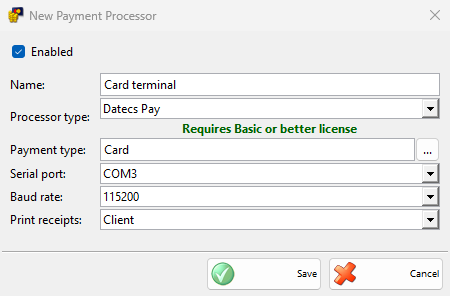
| Field | What it does |
|---|---|
| Serial port: | The COM port of the terminal. |
| Baud rate: | The speed of the port, 115200 by default. It must match the terminal. |
| Print receipts: | Client by default. Client adds the card payment details at the end of the cash receipt. Merchant prints a separate Merchant copy slip. Client & Merchant does both and None prints nothing. |
The client details need a cash receipt printer or a device with Print customer orders in Devices. The merchant copy is printed on the device with Print customer orders, or on the cash receipt printer when there is no such device.
Taking a payment
- Save a sale and choose a payment type of the processor in the Payment window, then click OK.
- The Process Card Payment window opens and shows what the terminal asks for, for example Present card, Insert card, Online authorization and Approved.
- When the terminal approves the payment, the window closes and the sale is saved with the receipts set in Print receipts:.
The window has no Cancel: stop the payment on the terminal. IncoPOS waits up to 2 minutes for the result. When a card has several applications, the first one is used. Payments of other documents and refunds are saved without the terminal.
Without a Basic or better license, IncoPOS shows the license message and the payment is not taken.
At the end of the day
An operator or manager end of day report can run Credit card payments reconciliation – DatecsPay, which closes the day of the terminal and prints its report on the device with Print customer orders. Select it in Edit End of Day Reports.
Troubleshooting
| Message | Solution |
|---|---|
| A message from the terminal, for example the reason the card was declined | Take the payment again, or ask for another card or another payment type. |
| “Error while processing the payment!” | IncoPOS could not talk to the terminal. Check the cable, Serial port: and Baud rate:. |