
The Zanzibar VFMS REST API server lets other programs, such as an ERP or a hotel system, issue fiscal receipts in Zanzibar through the Virtual Fiscal Management System (VFMS) of the Zanzibar Revenue Authority (ZRA). The API is compatible with Incotex Invoice Monitoring, so a program made for it works with IncoPOS. Every fiscal document is also recorded as a sale in IncoPOS. The list of servers is in Servers, and the fields that every server has are in Adding, editing and deleting servers.
What you need
- A Zanzibar VFMS device in Devices on this workstation, with the ZRA credentials of the sales unit. The sales go through it.
- For the hotel requests, the integration ID and token of the hotel accommodation unit and of the hotel services unit, from ZRA.
- A license on this workstation. The window shows “Requires Basic or better license”.
- A free port on this workstation, open in its firewall.
Set up the server
- Go to Edit → Administration → Servers… and click New.
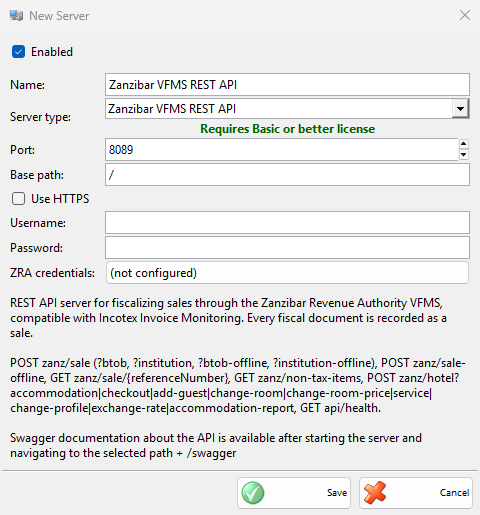
- Select Zanzibar VFMS REST API in Server type:. Port: gets 8089 and Base path: gets /.
- Enter Username: and Password:, and select Use HTTPS for encrypted connections.
- For a hotel, click the button next to ZRA credentials: and enter the two units, see ZRA credentials.
- Click Save. Allow the port in the firewall when IncoPOS asks.
| Field | What it does |
|---|---|
| Port: | The port of the API. No other enabled server of the workstation may use it. |
| Base path: | The start of every API address. The API description opens at the base path followed by swagger. |
| Username:, Password: | The login that the programs send with each request. Username: is required. With an empty Password:, the API takes requests without a login. |
| Use HTTPS | The API takes only encrypted connections. Certificate: shows the certificate of the server. The setup is the same as in Tanzania VFD REST API. |
| ZRA credentials: | The button shows the integration IDs of the hotel units, or (not configured), and opens ZRA Credentials. |
ZRA credentials
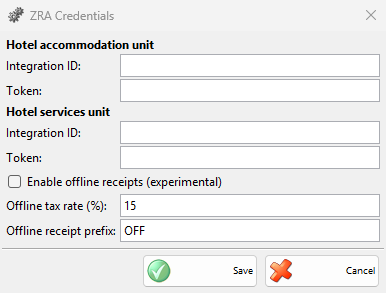
The ZRA Credentials window holds the ZRA login of the two hotel units and the offline receipts. It is saved for this workstation at once with Save, without saving the server.
| Field | What it does |
|---|---|
| Hotel accommodation unit: Integration ID:, Token: | The ZRA login for the accommodation requests, such as check-in, guests, rooms and checkout. |
| Hotel services unit: Integration ID:, Token: | The ZRA login for the hotel services. |
| Enable offline receipts (experimental) | When ZRA cannot be reached, a sale gets a local receipt number at once and is sent to ZRA later. |
| Offline tax rate (%): | The tax rate of the offline receipts, 15 by default. |
| Offline receipt prefix: | The start of the offline receipt numbers, OFF by default. |
A request can also carry its own integration ID and token, which then replace the ones of the window.
How it works
The API takes sales (POST zanz/sale, with ?btob or ?institution for business and institution customers), hotel requests (POST zanz/hotel), the stored result of a sale (GET zanz/sale/{referenceNumber}), the items that ZRA does not tax (GET zanz/non-tax-items) and a health check (GET api/health). The description of the server type in the window lists all of them.
Each sale is recorded in the default location of IncoPOS and fiscalized through the Zanzibar VFMS device, one at a time. A reference number sent again returns the stored result, or signs the recorded sale when it was not fiscalized before. The hotel checkout and services are also recorded as sales.
| Case | Answer of the API |
|---|---|
| ZRA does not answer in time | The sale is recorded with an unknown state. The answer says not to retry with the same reference. |
| ZRA cannot be reached | An error, or with offline receipts on, a local receipt. The offline receipts are sent to ZRA in the background, again every 2 minutes while ZRA is not reachable. |
| ZRA already has the reference, or refuses the sale | An error with the answer of ZRA. |
| No license | “The server is not licensed”. |
| No Zanzibar VFMS device | “No Zanzibar VFMS device is configured as the sales data controller on the server”. |
| No credentials for a hotel unit | “The ZRA credentials for this unit are not configured”. |
Troubleshooting
| Problem | Solution |
|---|---|
| “Username cannot be empty!” | Enter Username:. |
| “Please enter a valid offline tax rate.” | Enter a number in Offline tax rate (%):. |
| “Server ‘…’ failed to start due to access denied.” | Windows does not let IncoPOS listen on the port. Click Copy command (Copy commands with HTTPS), run them in a Command Prompt opened as Administrator, then save the server again or restart IncoPOS. |
| “Server ‘…’ is running, but the firewall may be blocking incoming connections on port …” | Other computers cannot reach the API. Click Copy command and run the command as Administrator, or allow the port in Windows Defender Firewall. |