
The Tanzania VFD REST API server lets other programs, and other IncoPOS workstations, issue fiscal receipts in Tanzania through the Tanzania VFD of this workstation. A program sends the invoice to the API, and the server records it as a sale, has it signed by the Tanzania Revenue Authority (TRA) through the Electronic Fiscal Device Management System (EFDMS), prints the receipt and answers with the fiscal data. The list of servers is in Servers, and the fields that every server has are in Adding, editing and deleting servers.
What you need
- A Tanzania VFD device, registered with TRA, in Devices on this workstation, and its receipt printer.
- A license on this workstation. The window shows “Requires Basic or better license”.
- A free port on this workstation, open in its firewall.
Set up the server
- Go to Edit → Administration → Servers… and click New.
- Select Tanzania VFD REST API in Server type:. Port: gets 9030 and Base path: gets /api/v1.
- Enter Username: and Password:, and Admin password: for the reports.
- Select Use HTTPS for encrypted connections, see HTTPS.
- Click Save. Allow the port in the firewall when IncoPOS asks.
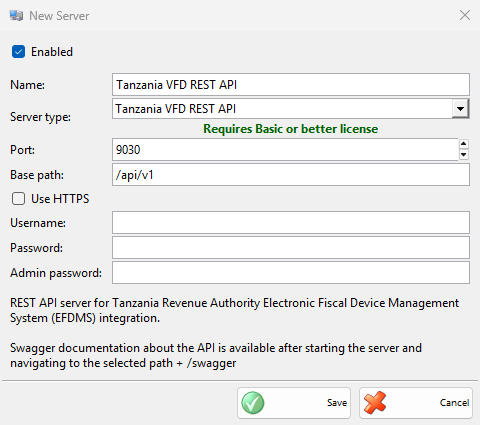
| Field | What it does |
|---|---|
| Port: | The port of the API. No other enabled server of the workstation may use it. |
| Base path: | The start of every API address, for example http://192.168.1.10:9030/api/v1/invoices. The API description opens at the base path followed by /swagger. |
| Username:, Password: | The login that the programs send with each request. Username: is required. With an empty Password:, the API takes requests without a login. |
| Admin password: | When filled in, the invoice list, the reports and the invoice generation need this password with the same user name. |
| Use HTTPS | The API takes only encrypted connections. Certificate: shows the certificate of the server. |
What the API does
| Request | What it does |
|---|---|
| POST invoices | Records the invoice as a sale and returns its fiscal data. An invoice number sent before returns the sale already recorded, without a second receipt. |
| GET invoices/{number} | Returns the fiscal data of a recorded invoice. |
| GET invoices, GET periodic-reports, GET zreports | The invoice list and the reports of a period. They need the admin password when it is set. |
| POST zreports | Prints the Z report and sends it to TRA. |
| POST generate-invoices | Issues an invoice for a total amount. Needs the admin password when it is set. |
| GET registration | Returns the TRA registration of the device. |
A sale from the API goes to the default location. The customer is found by name, phone and ID, or added as a partner. An item is found by name or code, or added as an item with Non-inventory or service. The VAT group comes from the tax code of the line. The receipt prints without any window on the screen. When the device asks for the daily Z report first, the server prints it and then the receipt. An invoice dated before today is refused with “Previous Date Provided”.
Other workstations
Another IncoPOS workstation can sign its sales through this server with a Tanzania VFD (via REST API Server) device in Devices: the address of this workstation, the port, and the user name, password and base path of the server.
HTTPS
When you save a server with Use HTTPS and no certificate, IncoPOS uses a certificate it made before on this computer or creates one. When the server starts, it may show “Server ‘…’ needs a one-time HTTPS setup. This requires administrator rights. Do you want to do it now?”. Click Set up now and confirm the Windows prompt. The server does not start when you decline. To use another certificate, click the button next to Certificate: and select one.
Troubleshooting
| Problem | Solution |
|---|---|
| “Username cannot be empty!” | Enter Username:. |
| “Server ‘…’ failed to start due to access denied.” | Windows does not let IncoPOS listen on the port. Click Copy command (Copy commands with HTTPS), run them in a Command Prompt opened as Administrator, then save the server again or restart IncoPOS. |
| “Server ‘…’ is running, but the firewall may be blocking incoming connections on port …” | Other computers cannot reach the API. Click Copy command and run the command as Administrator, or allow the port in Windows Defender Firewall. |
| “The HTTPS certificate of server ‘…’ was not found. Please edit the server and select a certificate.” | The certificate was removed from Windows. Open the server, select a certificate, or click Clear and save to get a new one. |
| “The HTTPS setup of server ‘…’ did not complete.” | Click Copy commands and run them as Administrator, as the message says. |
| The API answers 403 with LICENSE_ERROR | The workstation has no valid license for the sale. Add the license. |