
The Tanzania EWURA Connector server reports the fuel sales of a station in Tanzania to the National Petroleum and Gas Information System (NPGIS) of EWURA. The Technotrade PTS-2 Receiver records the pump transactions as fiscalized sales on its own. This server signs each of those sales with the certificate of the station and sends it to EWURA. The list of servers is in Servers, and the fields that every server has are in Adding, editing and deleting servers.
What you need
- A Technotrade PTS-2 Receiver server and a Tanzania VFD device registered with TRA, both on this workstation.
- The EWURA license number of the station, and the vendor TIN and service provider id that EWURA issued for the integration.
- The signing certificate of the station, installed in Windows on this computer.
- A license on this workstation. The window shows “Requires Basic or better license”.
Set up the server
- Go to Edit → Administration → Servers… and click New.
- Select Tanzania EWURA Connector in Server type:.
- Enter EWURA license:.
- Click the button next to Certificate: and select the signing certificate.
- Click the button next to Station details: and fill in the station, see Station details.
- Click Save.
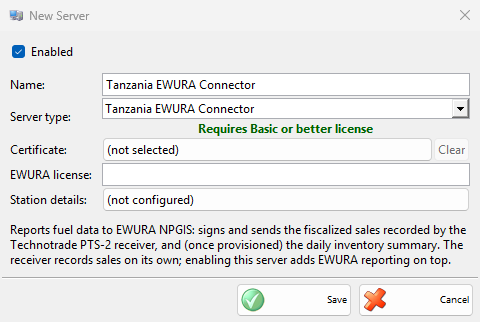
| Field | What it does |
|---|---|
| EWURA license: | The EWURA license number of the station, sent with each report. It is required. |
| Certificate: | The certificate that signs the reports. The button shows its name, or (not selected). Clear removes it. |
| Station details: | The button shows the station name, district and region, or (not configured), and opens EWURA Station Details. |
Station details
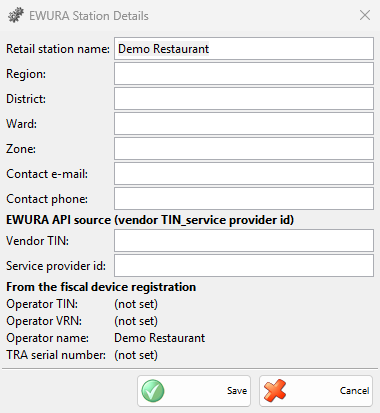
The EWURA Station Details window holds the data that EWURA needs with every sale. The fields start with what IncoPOS already knows from the Tanzania VFD registration and the company. Save keeps them for this workstation at once, without saving the server.
| Field | What it does |
|---|---|
| Retail station name:, Region:, District:, Ward: | The name and the place of the station. Required. |
| Zone:, Contact e-mail:, Contact phone: | The zone and the contact person of the station. |
| Vendor TIN:, Service provider id: | The two values that EWURA issued for the integration. Together they identify the sender of each report. Required. |
| Operator TIN:, Operator VRN:, Operator name:, TRA serial number: | Read from the registration of the Tanzania VFD, shown only. (not set) means that the device is not registered yet. |
How it works
When the server starts with the certificate, the vendor TIN and the service provider id set, it registers the station with EWURA, once. Then it takes each fuel sale that the PTS-2 receiver of this workstation recorded, also the sales made while the server was off, signs it and sends it in the background. Nothing shows on the screen.
A report that EWURA accepts, or already has, is done. A report that EWURA rejects as wrong is not sent again, and the rejection is written in the Application Log. Any other answer, or no connection, is tried again, after 2 minutes when EWURA cannot be reached. While the license number, the vendor TIN or the service provider id is missing, the sales wait and are sent once they are set.
Troubleshooting
| Problem | Solution |
|---|---|
| “Address cannot be empty!” | Enter EWURA license:. |
| “Please enter the retail station name.”, or the same for the region, district, ward, vendor TIN or service provider id | Fill in that field of EWURA Station Details. |
| The sales do not reach EWURA | Check that the server is enabled and licensed on the workstation of the PTS-2 receiver, that the certificate is selected and still installed, and that Station details: is filled in. The Application Log has the reason of each rejected report. |
| Operator TIN and the other registration values show (not set) | Register the Tanzania VFD device with TRA in Devices first. |