
The Tanzania Bureau de Change Server server is for bureaux de change in Tanzania. The exchange software of the bureau writes each transaction as a text file into a folder. The server reads the file, records the transaction in IncoPOS, has a sale signed by the Tanzania Revenue Authority (TRA) through the Tanzania VFD, prints the receipt and uploads the transaction report to the FTP server of the Bank of Tanzania (BOT). The list of servers is in Servers, and the fields that every server has are in Adding, editing and deleting servers.
What you need
- A Tanzania VFD device, registered with TRA, in Devices on this workstation, and a receipt printer.
- The bureau de change license number (BCL) and the BOT FTP host, port, user, password and path, from the Bank of Tanzania.
- A license on this workstation. The window shows “Requires Basic or better license”.
- Exchange software that writes the transactions in the FPDriver command format: E_SEL or E_BUY with the customer, E_ITM for each currency with its amount and rate, and optionally E_DOC, C_CPY and C_DRAW. Files with fiscal receipt commands (R_…) are for the Tanzania Fiscal Receipts Server.
Set up the server
- Go to Edit → Administration → Servers… and click New.
- Select Tanzania Bureau de Change Server in Server type:. File pattern: gets *.txt.
- Select the three folders and enter the BOT FTP settings and the BCL number, see the table below.
- Click Test to check the FTP connection, then click Save. When the server is enabled, saving tests the connection again and asks “Do you want to save the server settings anyway?” when it fails.
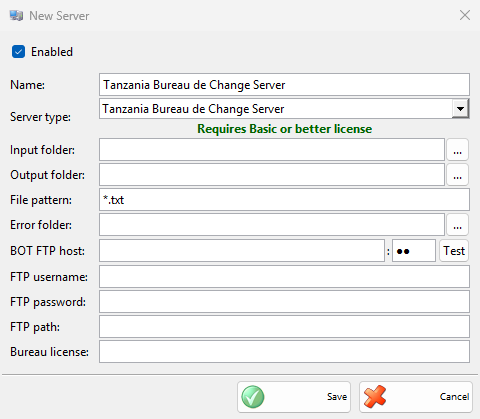
| Field | What it does |
|---|---|
| Input folder: | The folder where the exchange software writes the transaction files. It must exist when the server starts, and no other enabled server may use it, see Settings of each type. |
| Output folder: | Where the processed files go, with the date and time added in front of the name. |
| Error folder: | Where the files that could not be processed go, each with a file next to it that gives the reason. Its name has .error before the extension, for example 20261113_101500_sale.error.txt. |
| File pattern: | Which files of the input folder are read. |
| BOT FTP host: | The FTP server of the Bank of Tanzania, with its port next to it. Both show as dots. |
| Test | Connects to the FTP server with the settings typed in the window and says whether it worked. |
| FTP username:, FTP password:, FTP path: | The BOT FTP login and the folder for the reports. FTP path: shows as dots. |
| Bureau license: | The BCL number of the bureau, written in each report. |
How it works
| Transaction | What the server does |
|---|---|
| E_SEL, the bureau sells foreign currency | Records a sale to the customer of the file in the default location, with one line per currency (the amount at the rate, in the exempt VAT group E), has it signed by TRA through the Tanzania VFD and prints the forex receipt with the TRA QR code. |
| E_BUY, the bureau buys foreign currency | Records a purchase from the customer, without TRA signing, and prints a receipt. |
C_CPY prints a copy of the receipt and C_DRAW opens the cash drawer. The customer is found or added as a partner with the ID type and number of the file. Each transaction is also queued as an XML report for the BOT FTP server. The reports are sent in the background, again after 10 minutes when the FTP server cannot be reached, and with a new file name when one with the same name is already there.
The server reads a file when it has not changed for 2 seconds, the oldest file first. It first renames the file to end in .processing, so a file that the exchange software is still writing waits, and a file is never processed twice, even when it cannot be moved to the output folder afterwards. When the server starts and finds a .processing file left from an earlier run, for example after a power failure, it moves it to the error folder without processing it, because its sale may already be signed. The Tanzania VFD REST API, the Bureau de Change and the Fiscal Receipts servers of the workstation sign their sales one at a time.
Troubleshooting
| Problem | Solution |
|---|---|
| “Input folder not selected!”, “Output folder not selected!”, “Error folder not selected!” | Select all three folders. |
| “FTP host cannot be empty!”, “FTP username cannot be empty!”, “FTP password cannot be empty!”, “Bureau license number cannot be empty!” | Fill in the field from the message. |
| “Connection to the FTP server failed:” after Test | Check the host, port, user, password and path from BOT and the internet connection of the workstation. |
| Files stay in the input folder | Check that the server is enabled and licensed, that the input folder existed when the server started and that the file names match File pattern:. |
| “The input folder must be different from the output and error folders!”, “Another server is already using one of these folders!” | Select other folders, see Settings of each type. |
| Files go to the error folder | Open the .error.txt file next to it. “Invalid forex transaction: missing items” or “missing customer data” means the file has no E_ITM or no E_SEL / E_BUY line. “Line …: R_… is a fiscal receipt command” means the file is a fiscal receipt: send it to the input folder of the Tanzania Fiscal Receipts Server. |
| “Processing of this file was interrupted. Check in IncoPOS whether the receipt was issued before sending the file again.” | IncoPOS closed while the file was processed. Find the transaction in the sales or purchases of the day. Put the file into the input folder again only when it is not there. |