
The Iute Credit & Wallet (Buy Now Pay Later) processor sends the sale to the MyIute app of the customer. The customer pays it there from the Iute wallet (Pay Now) or with an Iute credit (Pay Later), and the program records the payment when Iute reports it as paid. You add the processor in Edit → Payments → Payment Processors…. It requires a Basic or better license. The fields that all types share are in Adding, editing and deleting payment processors.
Before you start
- A Basic or better license. The edit window shows “Requires Basic or better license” next to the type, in green when the license is there and in red when it is not.
- A partnership with Iute and the API data that Iute gives for your shop: the API address, the API key and the identifiers of the point of sale and the salesman.
- A payment type for Iute, for example “Iute”, added in Payment types.
- The currency code as the name of the main currency in Currencies. The order is sent in that currency.
- An internet connection on the workstation.
Set up the processor
- Go to Edit → Payments → Payment Processors… and click New.
- Select Iute Credit & Wallet (Buy Now Pay Later) in Processor type:.
- Enter the Name:, the data from Iute and the Payment type:, and click Save.
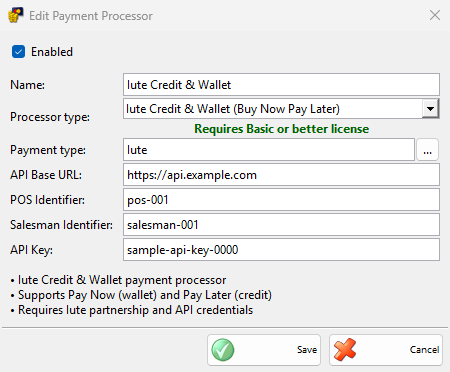
| Field | What it does |
|---|---|
| API Base URL: | Required. The address of the Iute API that Iute gives you. |
| POS Identifier: | Required. The identifier of your point of sale at Iute. |
| Salesman Identifier: | Required. The identifier of the salesman at Iute. |
| API Key: | Required. The API key from Iute. |
| Payment type: | Required. Payments of these types send an order to Iute. |
The program checks the data only when it sends the first order, so make a small test payment after the setup.
Take an Iute payment
- Save the sale and, in the Payment window, choose the Iute payment type. Click OK.
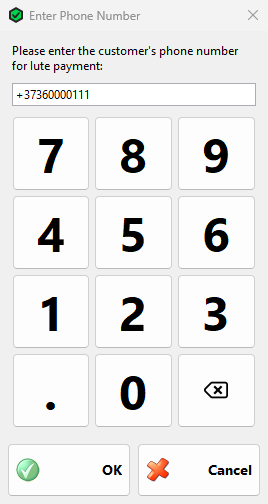
- The Enter Phone Number window asks “Please enter the customer’s phone number for Iute payment:”. Enter the phone number of the customer’s MyIute account and click OK. A number starting with 00 is sent with + instead. OK is enabled for 9 to 14 digits, or 10 to 15 characters with a leading +.
- The Processing Iute Payment window shows “Creating order…” and then “Waiting for customer to complete payment in MyIute app…”.
- The customer opens the order in MyIute and pays it. For a credit, the window shows “Application approved. Waiting for customer signature…” until the customer signs.
- When Iute reports the order as paid, the window closes and the sale is saved.
The order has the amount of the payment, the main currency and up to 20 rows of the sale with their names, codes, prices and quantities. The program asks Iute for the status 5 seconds after the order and then every 5 seconds, for up to 5 minutes. Stop ends the wait and returns to the Payment window without paying, and so does Cancel in the phone window.
Without a license, the program shows “The Payments Processor module is not free! To use this module please purchase a license.” once and records the payment as an ordinary payment without Iute.
Troubleshooting
| Problem | Solution |
|---|---|
| “Customer is not registered with MyIute. An SMS invitation has been sent. Please try again after they sign up.” | The phone number has no MyIute account. Iute sends the customer an invitation. Take the payment again when the customer has signed up, or choose another payment type. |
| “Failed to create Iute payment order. Please check your connection and try again.” | Iute could not be reached. Check the internet connection, API Base URL: and API Key:. |
| “Failed to create Iute payment: text“ | Iute refused the order. The text comes from Iute, for example about the identifiers or the amount. |
| “Payment timeout. Please check in MyIute app if the payment was completed.” | Iute did not report the payment within 5 minutes. Check the order with the customer in MyIute before you try again. |
| A message that the payment was cancelled | The customer cancelled the order in MyIute. The Payment window stays open: try again or choose another payment type. |
| “Please fill out all the fields!” when saving the processor | Fill in all four fields of Iute. |