
A payment processor connects IncoPOS to a card terminal, a cash machine or a payment service. When a payment of a chosen payment type is saved, the processor takes it on the device or the service and the payment is saved only when it is approved. The Payment Processors window lists the processors of the workstation you work on: each workstation has its own list. Open it with Edit → Payments → Payment Processors…. To add or change a processor, see Adding, editing and deleting payment processors.
Before you start, get a merchant account and the device or the service from the bank or the provider, and the connection settings of the terminal. Then add a payment type, for example a card payment type, for each processor.
The Payment Processors window
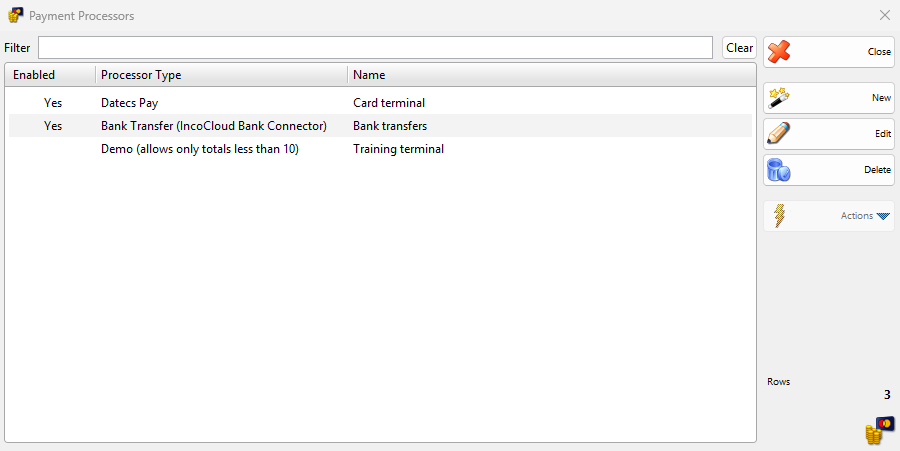
| Control | What it does |
|---|---|
| Filter | Shows only the processors whose name contains the typed text. |
| Clear | Clears Filter. |
| Enabled, Processor Type, Name | The columns of the list. Yes in Enabled marks a processor that takes payments. |
| New | Opens the New Payment Processor window. |
| Edit | Opens the selected processor in the Edit Payment Processor window. A double-click does the same. |
| Delete | Deletes the selected processors. Only a processor without Enabled can be deleted. |
| Close | Closes the window. |
Processor types
Each type has its own page with its settings and what the cashier sees.
| Type | What it connects to | License |
|---|---|---|
| Bank Transfer (IncoCloud Bank Connector) | Pays a document with a bank transfer downloaded by the IncoCloud Bank Connector service. | The Bank Connector service |
| Borica | A card terminal with the Borica cash register protocol, on a serial port. | Basic or better |
| Cashmatic | A Cashmatic cash machine on the network, which takes notes and coins and gives the change. | Basic or better |
| Daraja M-Pesa | M-Pesa in Kenya through the Safaricom Daraja API: the customer confirms the payment request on the phone. | Basic or better |
| Datecs Pay | A Datecs Pay card terminal on a serial port. | Basic or better |
| Demo (allows only totals less than 10) | No device. Approves card payments under 10 after 5 seconds, to try the payment flow. | Basic or better |
| DSK Bank | A DSK Bank card terminal on a serial port. | Basic or better |
| FIBank | A Fibank card terminal on a serial port. | Basic or better |
| FIBank – Spectra | A Fibank SPECTRA card terminal on a serial port. | Basic or better |
| Hotel Link – Clock PMS+, Hotel Link – Creato Solutions, Hotel Link – Fidelio / Opera M87, Hotel Link – IncoPOS Internal Booking, Hotel Link – Mews Systems, Hotel Link – Protel | Charges a sale to a guest of the hotel system, or to a booking in IncoPOS. One page for all six. | Pro |
| INPAS Smart Sale | An INPAS card terminal with Smart Sale, on a serial port. Also refunds returns and voids deleted payments. | Basic or better |
| Iute Credit & Wallet (Buy Now Pay Later) | Iute, on the internet: the customer pays the order in the MyIute app, from the wallet or with a credit. | Basic or better |
| Mobile Money | M-Pesa and Tigo Pesa payments to your phone number, read from the SMS by the Mobile Money Receiver Android app. | Basic or better |
| myPOS | A myPOS card terminal on a serial port. | Basic or better |
| Payment Server | Sends the payment to another workstation, whose Payment Server takes it with the processor of that workstation. | Basic or better |
| Postbank – Mellon | A Postbank card terminal with the Mellon protocol, on a serial port. | Basic or better |
| SumUp – Solo Card Reader | A SumUp Solo card reader, through the SumUp service on the internet. | Basic or better |
| Translink REST | A card terminal through the Translink service on the computer. Also refunds returns and voids deleted payments. | Basic or better |
| UBB | A UBB card terminal on a serial port. | Basic or better |
How a payment is taken
A processor works in the Payment window of a document, for example when you save a sale. When you click OK, each enabled processor of the workstation looks at the new payments: it takes the paid payments of its Payment type:. Card terminals take only the payments of sales. A payment of the same type in another document, for example an advance payment, is saved without the terminal, and so is a refund, unless the page of the type says otherwise.
While the terminal works, the Process Card Payment window shows the amount and the status of the terminal. With some types Cancel stays disabled and counts down for the first 30 seconds.
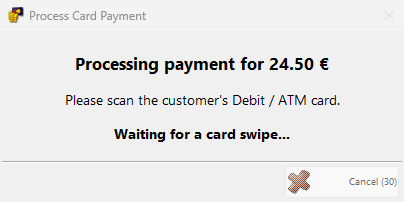
- Approved: the window closes and the document is saved with the payment.
- Declined, cancelled or timed out: a message says why, the Payment window stays open and nothing is saved. Take the payment again or choose another payment type.
- A smaller amount taken: the Payment window stays open with the rest still to pay, for example when a bank transfer has less money left than the total.
Without a Basic or better license, the first payment shows “The Payments Processor module is not free! To use this module please purchase a license.” The page of each type says what happens to the payment then.
Card terminal actions at the end of the day
When an enabled processor of the workstation supports them, the window of an end of day report lists these actions. Select them in Edit End of Day Reports, so that the terminal closes its day together with the shift.
| Action | Types | Reports |
|---|---|---|
| Credit card payments reconciliation – … | Borica, DatecsPay, INPAS, Postbank / Mellon, Translink | Manager reports. DatecsPay also in operator reports. |
| Credit card payments report – … | Postbank / Mellon, Translink | Manager reports |
Permissions
All permissions are set in Edit → Administration → Permissions…, under Edit, Payments and Payment Processors….
| Permission | What it allows | Not allowed by default for |
|---|---|---|
| New | Adding processors. | Operators |
| Edit | Changing processors. | Operators |
| Preview | Without Edit, the button becomes Preview and opens the processor with only a Close button. | Operators |
| Delete | Deleting processors. | Operators |
Troubleshooting
| Problem | Solution |
|---|---|
| A processor is not in the list | Check Filter. The list shows only the processors of this workstation: open the window on the workstation where the processor was added. |
| A card payment is saved but the terminal did nothing | Check that the processor is enabled on this workstation and that the payment type of the payment is in its Payment type:. Card terminals take only the payments of sales. |
| “The Payments Processor module is not free! To use this module please purchase a license.” | The workstation has no Basic or better license. Add the license, or clear Enabled on the processor. |
FAQ
Can two workstations use one terminal?
Yes. Connect the terminal to one workstation with its processor and a Payment Server, and give the other workstations a Payment Server processor with the same address.
Can one workstation have several processors?
Yes. Give each processor its own payment types, for example one card payment type for each terminal, so that each payment goes to one processor.